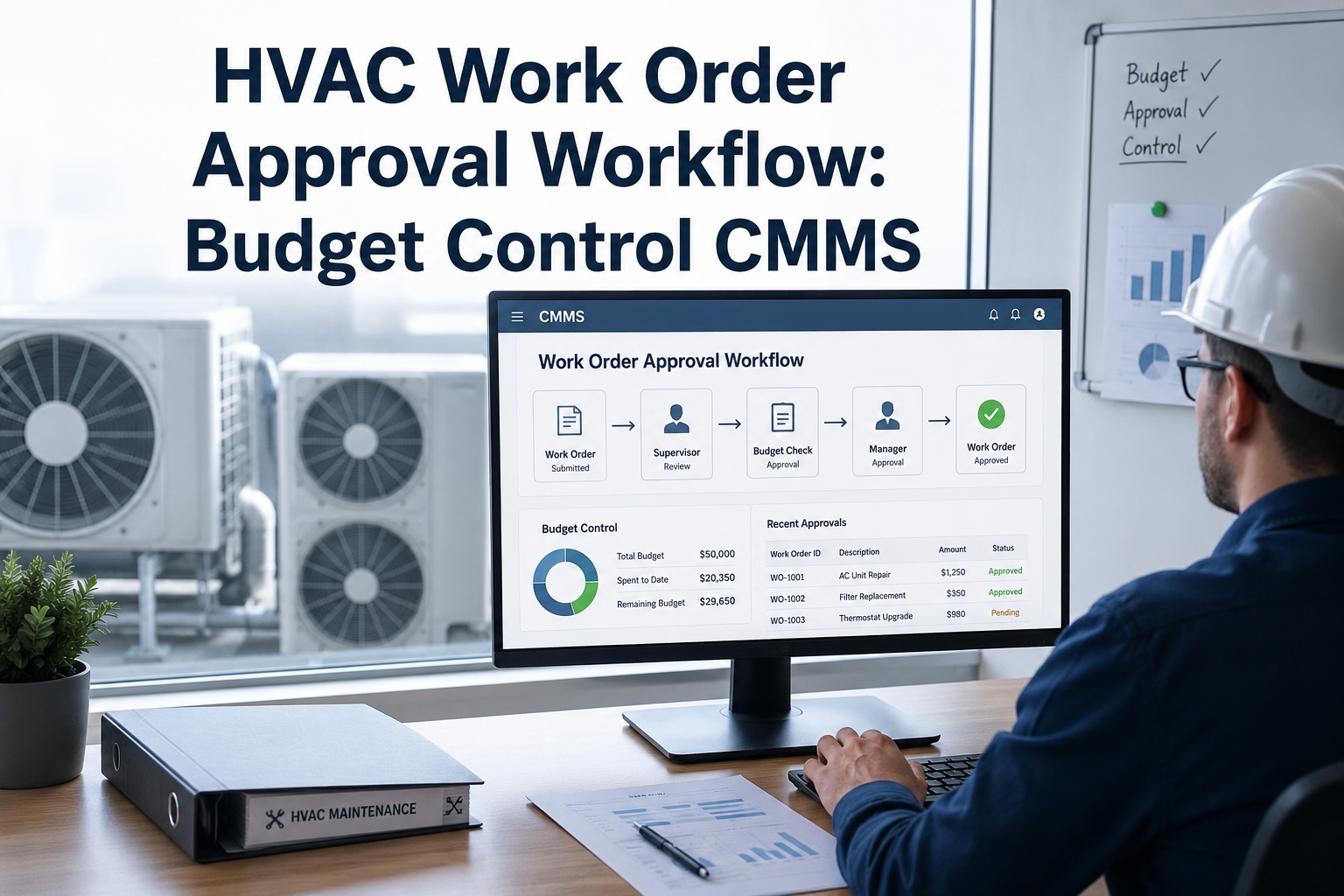
An HVAC work order approval workflow is the set of rules and routing steps that govern how maintenance requests are reviewed, authorized, and executed — and it is the single most effective lever for controlling maintenance spend in commercial and industrial facilities. Without budget control gates tied to spend thresholds, HVAC teams routinely overshoot their annual maintenance budget by 15–25% on unplanned repairs, emergency part orders, and after-hours labor. A CMMS approval workflow automates multi-level sign-off so that no work order exceeds its authorized budget without the right people reviewing it first. If you are evaluating how to tighten financial discipline around your maintenance operations, you can Start Free Trial of OxMaint and deploy automated approval routing in under a day.
How much unapproved HVAC spend slips through your maintenance budget this quarter?
Most facilities discover 12–18% of their annual HVAC maintenance spend bypasses any formal approval gate — emergency compressor replacements, overtime labor, and expedited parts that nobody reviewed until the invoice arrived. A CMMS-based work order approval workflow closes that gap with automated spend-threshold routing and multi-level sign-off.
Why HVAC work order approval routing fails without a CMMS budget gate
Facilities relying on email chains or paper requisitions typically take 3–7 business days to approve a $5,000 HVAC repair — during which a minor chiller fault can escalate into a $25,000 compressor failure. A CMMS approval workflow collapses that cycle to hours while enforcing every budget rule.
- Tech calls supervisor, waits 2–4 days for verbal approval
- Parts ordered without PO or budget code verification
- Finance discovers overspend during month-end close
- No audit trail linking work order to authorization
- Emergency repairs bypass budget review entirely
- Auto-routes to approver based on dollar threshold in seconds
- Budget code validated before PO is generated
- Real-time spend dashboard flags overruns the same day
- Every approval logged with timestamp, user, and dollar amount
- Emergency work flows through expedited but tracked gate
Spend threshold tiers: building your HVAC approval matrix
The backbone of any HVAC budget control guide is a tiered spend-approval matrix. Below is a field-tested framework used by mid-to-large facilities managing 150+ HVAC assets, adaptable to your own dollar thresholds and organizational hierarchy.
Lead Technician / Supervisor
Routine filter changes, belt replacements, refrigerant top-offs. System auto-approves if the asset's monthly spend is under budget. Logged for audit without requiring manual sign-off.
Maintenance Manager
Motor replacements, coil repairs, control board swaps. Notification sent to manager via mobile app; approval or rejection expected within 4 working hours to prevent downtime escalation.
Maintenance Manager + Facilities Director
Compressor rebuilds, large VAV system repairs, chiller tube cleaning. Requires sequential approval: manager first, then director. Budget impact statement auto-generated and attached to the work order.
Director + Finance + Operations VP
Equipment replacement, major system overhauls, capital-adjacent repairs. Requires ROI justification, alternative quote comparison, and finance budget validation before any PO is issued.
How to set up a multi-level CMMS approval workflow in 5 steps
Deploying work order sign-off rules in a modern CMMS takes hours, not weeks. Here is the step-by-step path teams follow to go from manual email approvals to fully automated budget-gated routing.
Define spend threshold tiers
Pull 12 months of HVAC work order data and segment by total cost. Identify the natural breakpoints — most facilities find four tiers ($500, $2.5K, $10K, $10K+) cover 95% of work orders. Assign each tier a maximum auto-approval limit and a required approver chain.
Map approver roles and backup delegates
For each tier, designate a primary approver and at least one delegate. The CMMS should auto-escalate to the delegate if the primary does not respond within a configurable SLA window (typically 4–8 hours). This prevents approval bottlenecks during PTO or shift changes.
Configure budget codes and cost centers
Link every HVAC asset to its GL budget code and annual allocation. When a work order is created, the CMMS checks remaining budget in real time. If the repair would push the asset or cost center over budget, the system automatically bumps the approval tier up one level.
Build emergency fast-track rules
Not every urgent repair can wait 8 hours for sign-off. Create a fast-track rule for safety-critical or downtime-threatening work orders: auto-approve up to a higher threshold (e.g., $5,000) but flag the work order for post-action review and require director acknowledgment within 24 hours.
Activate notifications and audit logging
Enable push notifications and email alerts for every approval request, approval action, and rejection. The CMMS should automatically log the approver name, timestamp, dollar amount, and approval rationale to create a defensible audit trail for ISO 55000 and internal finance reviews.
The cost of unapproved HVAC work: a real-world scenario
Consider a 180-asset commercial facility spending $42,000 annually on HVAC maintenance and repairs. Without an approval workflow, here is how costs compound across a single quarter.
With a CMMS approval workflow in place, the same facility typically reduces quarterly overspend by 60–75% — catching misallocated charges before they post, negotiating parts pricing before expedited shipping kicks in, and routing overtime-eligible work orders to the lowest-cost qualified technician. Annualized savings on this $42K budget: $17,000–$21,000.
CMMS approval workflow features comparison: what to look for
Not every CMMS supports true multi-level budget control. Use this checklist when evaluating platforms for HVAC spend approval automation.
| Approval Feature | Spreadsheets / Email | Basic CMMS | OxMaint CMMS |
|---|---|---|---|
| Spend-threshold auto-routing | Manual | Limited (2 tiers) | Unlimited tiers |
| Real-time budget code validation | None | Static annual budget | Live GL integration |
| Multi-level sequential sign-off | Email chain | Parallel only | Sequential + parallel |
| SLA-based auto-escalation to delegate | None | Manual reminder | Automated escalation |
| Emergency fast-track with post-review | Verbal approval | No tracking | Configurable rules |
| Audit trail (timestamp, user, amount, rationale) | Partial | Basic log | Full ISO 55000-ready |
| Mobile approval (push notifications) | None | Email only | Native mobile app |
How OxMaint automates HVAC work order approval and budget control
OxMaint is an AI-powered CMMS and EAM platform that embeds spend-threshold approval routing directly into the work order lifecycle — so budget control happens before the cost is incurred, not after the invoice arrives.
Dynamic spend-threshold routing
Configure unlimited approval tiers tied to dollar amounts, asset class, or cost center. OxMaint auto-routes each HVAC work order to the correct approver chain the moment it is created — reducing average approval time from 3 days to under 6 hours.
Outcome: 70% faster approval cycleReal-time budget gate validation
Every work order checks remaining budget against the linked GL code before approval is requested. If the repair would exceed the allocated budget, OxMaint automatically escalates to a higher approval tier and attaches a budget impact statement.
Outcome: 60–75% reduction in budget overrunsMobile approval with push notifications
Approvers receive instant push notifications on iOS and Android. Approve, reject, or request more info directly from the mobile app with a single tap — no laptop, no email chain, no delay. SLA timers auto-escalate to delegates if the primary approver is unavailable.
Outcome: 90% of approvals completed within 4 hoursFull audit trail and compliance reporting
Every approval action is logged with user identity, timestamp, dollar amount, and rationale. Generate compliance reports for ISO 55000, internal finance audits, or SOX reviews in one click — no manual reconciliation required.
Outcome: 100% audit-ready with zero manual effort"We cut HVAC budget overruns by $19,000 in the first year after deploying OxMaint's approval workflow. The mobile push approvals alone saved my managers a full day every week — and finance finally has the audit trail they always wanted."
See OxMaint's approval workflow on your own HVAC assets
Book a 30-minute demo and we will configure a live spend-threshold approval matrix tailored to your facility's budget tiers, approver hierarchy, and HVAC equipment list.
HVAC work order approval workflow: frequently asked questions
What is an HVAC work order approval workflow?
An HVAC work order approval workflow is a set of automated rules that route maintenance work orders to the right approver based on cost, asset type, or budget code before any work begins. In a CMMS like OxMaint, the workflow evaluates the estimated cost against pre-configured spend thresholds and automatically notifies the appropriate manager for sign-off. This prevents unauthorized spending, creates an audit trail, and ensures every repair is budget-validated before parts are ordered or labor is dispatched.
How do spend thresholds work in a CMMS approval workflow?
Spend thresholds are dollar-amount rules that determine who must approve a work order. For example, work orders under $500 may auto-approve, $500–$2,500 requires a maintenance manager, and anything over $10,000 requires multi-level sign-off including finance. OxMaint checks each work order's estimated cost against these tiers in real time and routes accordingly. You can also set the system to escalate approval if a work order would push an asset or cost center over its remaining annual budget.
Can a CMMS handle emergency HVAC repairs without delaying approval?
Yes. A well-configured CMMS approval workflow includes emergency fast-track rules that allow safety-critical or downtime-threatening repairs to proceed immediately at a higher auto-approval limit — for example, up to $5,000 without pre-approval. The work order is flagged for post-action review, and the director or facilities manager must acknowledge the expense within 24 hours. You can see this in action by booking a demo at calendly.com/oxmaintapp/30min where we configure live fast-track rules on sample HVAC assets.
How long does it take to set up multi-level approval routing in OxMaint?
Most facilities go live with a fully configured multi-level approval workflow in 4–8 hours. The process involves defining your spend tiers, mapping approver roles and delegates, linking budget codes to HVAC assets, and enabling notifications. OxMaint provides pre-built approval templates based on common HVAC organizational structures, so you can start with a proven framework and customize from there. A 180-asset facility typically completes setup in a single afternoon.
How much does an HVAC approval workflow reduce budget overruns?
Facilities that deploy CMMS-based approval workflows typically reduce HVAC maintenance budget overruns by 60–75% in the first year. The savings come from three sources: catching misallocated charges before they post, eliminating expedited parts shipping premiums by approving repairs earlier, and preventing overtime labor caused by approval delays. On a $42,000 annual HVAC budget, that translates to $17,000–$21,000 in recovered spend — often paying for the CMMS subscription several times over.
Stop letting unapproved HVAC spend drain your maintenance budget
Deploy OxMaint's automated approval workflow and see exactly where every maintenance dollar goes — before it leaves your budget. Start your free trial today or book a personalized demo with our team.
Free 14-day trial · No credit card