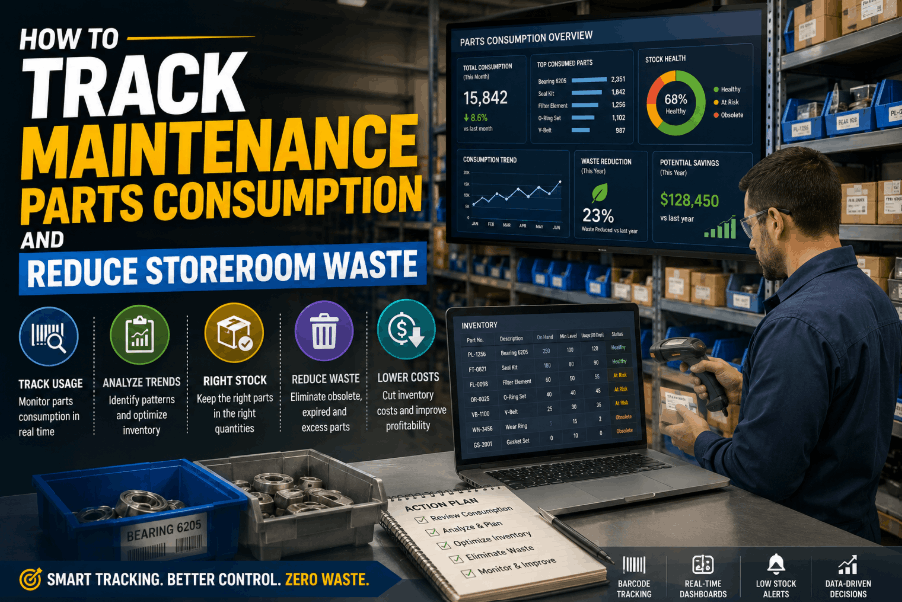
Uncontrolled maintenance parts consumption is one of the leading causes of inflated MRO spend in manufacturing facilities. When technicians pull spare parts without logging usage, storerooms accumulate dead stock, critical components go missing at the wrong moment, and year-end inventory counts reveal expensive write-offs that could have been prevented. Sign Up Free to connect your work orders directly to parts consumption inside Oxmaint's CMMS — so every part pulled is tracked, costed, and linked to an asset. The gap between what your storeroom receives and what it actually consumes is where maintenance budget leaks silently. Book a Demo to see how Oxmaint gives maintenance planners real-time visibility into parts usage, reorder triggers, and storeroom waste patterns across every production line.
MRO INVENTORY · PARTS TRACKING · STOREROOM OPTIMIZATION
Connect Work Orders to Parts Consumption in Oxmaint
Track every spare part from storeroom shelf to work order completion — reduce MRO waste and optimize reorder points across your entire facility.
Why Maintenance Parts Consumption Tracking Breaks Down in Most Facilities
Most plants rely on spreadsheets, paper pick slips, or disconnected ERP modules to manage storeroom activity — none of which tie parts usage back to individual assets or work orders in real time. Without a closed-loop between the CMMS and the storeroom, consumption data is always stale, reorder decisions are guesswork, and waste is invisible until it hits the balance sheet. Sign Up Free to start linking parts directly to preventive and corrective work orders in Oxmaint.
COMMON STOREROOM WASTE & PARTS TRACKING FAILURES
01
No Work Order Linkage
Parts are issued without being tied to a work order or asset, making it impossible to calculate true maintenance cost per machine.
02
Phantom Inventory
System records show stock on hand, but physical counts reveal shortages — caused by unlogged withdrawals and manual pick errors.
03
Excess Dead Stock
Parts ordered based on gut feel instead of consumption data pile up in the storeroom, tying up capital in slow-moving or obsolete inventory.
04
Reactive Reordering
Without min/max thresholds driven by actual usage history, planners only reorder after a stockout has already caused downtime.
05
No Asset-Level Cost Visibility
Finance and maintenance teams cannot identify which assets consume the most parts spend — blocking informed repair-versus-replace decisions.
06
Audit and Compliance Gaps
Paper-based storeroom logs fail ISO 55000 and internal audit requirements, with no traceability from part purchase to installation point.
How to Track Maintenance Parts Consumption: A Structured Approach
Effective MRO inventory tracking is built on four capabilities: work order–linked issuance, real-time stock adjustment, consumption history by asset, and data-driven reorder triggers. Book a Demo to see how Oxmaint's parts module delivers all four inside the same CMMS your technicians already use for work orders.
PARTS CONSUMPTION TRACKING — PROCESS LAYERS
Issuance
Work order opened
Part number, quantity, technician, asset ID
Real-time stock deduction
WO-linked parts issuance
Returns
Work order closed
Unused quantity returned, condition logged
Accurate net consumption
Return-to-stock workflow
Reorder
Quantity hits reorder point
Min/max thresholds, lead time, vendor
Automatic purchase request
Auto reorder triggers
Analysis
Monthly / quarterly
Consumption rate, cost per asset, ABC class
Storeroom waste identification
MRO consumption reports
Audit
Physical count cycle
System vs. physical variance
Shrinkage and adjustment records
Cycle count module
Key Storeroom KPIs Every Maintenance Planner Should Track in 2026
Tracking parts consumption without measuring performance against benchmarks produces data without direction. These storeroom KPIs translate raw consumption figures into actionable decisions for inventory optimization and MRO spend control. Book a Demo to see how Oxmaint's live KPI dashboard surfaces these metrics automatically across your facility.
STOREROOM & MRO INVENTORY KPI REFERENCE
Inventory Turnover
Annual consumption ÷ average stock value
2–4× per year
Dead stock and over-purchasing patterns
Review slow-moving SKUs quarterly
Stockout Rate
Stockouts ÷ total part requests × 100
Below 2%
Reorder point accuracy and lead time gaps
Adjust min/max for recurring stockouts
Parts Cost per WO
Total parts issued ÷ work orders completed
Asset-class specific
High-consumption assets and repair loops
Flag assets for repair-vs-replace review
Inventory Accuracy
Matched count lines ÷ total count lines × 100
Above 97%
Phantom inventory and shrinkage
Increase cycle count frequency
MRO Spend Ratio
MRO spend ÷ total maintenance budget × 100
Below 35%
Reactive vs. planned maintenance balance
Shift PM program to reduce emergency parts
How Oxmaint Eliminates Storeroom Waste Through CMMS-Linked Parts Tracking
Oxmaint connects every parts transaction directly to a work order, asset, and technician — eliminating the disconnected storeroom logs that create phantom inventory and uncontrolled MRO spend. Sign Up Free and go live with parts tracking integrated into your existing work order workflow in under 14 days. When a technician opens a corrective or preventive work order in Oxmaint, the parts required are pre-populated from the asset's maintenance history — reducing unplanned withdrawals and enabling accurate consumption forecasting. Every issuance, return, and reorder is timestamped, auditable, and reportable by asset, location, or cost center.
HOW OXMAINT OPTIMIZES PARTS CONSUMPTION AND STOREROOM CONTROL
01
Work Order Parts Linkage
Every part issued is tied to a specific work order and asset — giving maintenance managers full cost-per-asset visibility and closing the storeroom-to-CMMS loop.
02
Auto Reorder Triggers
Set minimum stock thresholds per part. When consumption drops inventory below the reorder point, Oxmaint automatically generates a purchase request — preventing stockouts before they cause downtime.
03
Consumption History by Asset
Every part ever used on an asset is logged with date, quantity, and work order reference — enabling failure pattern analysis and accurate PM parts kitting.
04
ABC Inventory Classification
Oxmaint automatically classifies storeroom inventory into A, B, and C categories based on consumption value — focusing storeroom management effort where it impacts spend most.
05
Cycle Count Module
Schedule rolling physical counts by bin location. Variance reports instantly flag phantom inventory, highlighting shrinkage and logging adjustment reasons for audit trails.
06
MRO Spend Dashboard
Live dashboards break down parts spend by asset class, work order type, technician, and facility — giving planners and finance teams a single source of truth for MRO budget control.
Reducing Storeroom Waste: Quarter-by-Quarter MRO Optimization Plan
Storeroom waste reduction is not a one-time cleanup — it is a continuous improvement cycle managed through structured quarterly reviews. Use this framework alongside Oxmaint's consumption reporting to progressively reduce dead stock, improve inventory accuracy, and bring MRO spend under control. Book a Demo to see how leading manufacturing facilities run this cycle inside Oxmaint.
Q1 — Baseline & Audit
Establish Inventory Accuracy Foundation
Complete full physical inventory count and reconcile system records
Tag all storeroom items with asset linkage and bin location
Identify and quarantine slow-moving and obsolete parts
Load min/max reorder thresholds into Oxmaint for all critical parts
Establish baseline MRO spend per asset class
Q2 — Consumption Analysis
Link Usage Data to Work Order Performance
Review top 20 highest-consumed parts and validate reorder points
Run ABC classification on full storeroom catalog
Identify assets with abnormal parts consumption patterns
Consolidate duplicate part numbers across vendor catalogs
Compare Q1 vs Q2 MRO spend ratio against target
Q3 — Waste Reduction
Eliminate Dead Stock and Reactive Purchasing
Dispose of or return obsolete inventory identified in Q1 audit
Implement kitting for recurring PMs — pre-pick parts per work order type
Review vendor lead times and adjust safety stock levels accordingly
Validate that auto reorder triggers prevented all Q3 stockouts
Measure inventory accuracy improvement from Q1 baseline
Q4 — Budget & Planning
Set MRO Targets and Build Next Year's Storeroom Plan
Generate full-year MRO spend report by asset, category, and vendor
Set parts budget targets per asset class for the coming year
Update PM task parts lists based on full-year consumption data
Review and renegotiate vendor contracts using Oxmaint spend data
Configure updated reorder points and safety stock for new year
SPARE PARTS TRACKING · MRO OPTIMIZATION · STOREROOM CONTROL
Cut MRO Waste with Oxmaint Parts Consumption Tracking
Work order–linked issuance, auto reorder triggers, ABC classification, and live MRO dashboards — all inside one CMMS built for manufacturing.
Frequently Asked Questions
Q1 What is maintenance parts consumption tracking?
It is the process of recording every spare part issued from a storeroom, linked to the work order and asset it was used on. It gives maintenance teams real-time inventory accuracy and cost-per-asset visibility.
Q2 How does a CMMS help reduce storeroom waste?
A CMMS like Oxmaint links every parts issuance to a work order, auto-generates reorder requests at threshold levels, and surfaces consumption reports that identify dead stock and over-purchased items before they become write-offs.
Q3 What is MRO inventory tracking in manufacturing?
MRO inventory tracking monitors the purchase, receipt, storage, issuance, and consumption of maintenance, repair, and operations supplies — enabling facilities to control spend, prevent stockouts, and eliminate excess inventory.
Q4 What is a good inventory accuracy rate for a plant storeroom?
Industry benchmark is 97% or above. Facilities below this level typically suffer from phantom inventory, reactive stockouts, and inflated MRO spend due to emergency purchasing.
Q5 Can Oxmaint auto-generate purchase requests when parts run low?
Yes. Oxmaint generates automatic purchase requests when stock drops to the configured reorder point — eliminating manual monitoring and preventing stockouts that cause unplanned downtime.
Q6 How do I identify which assets are consuming the most parts spend?
Oxmaint's MRO spend dashboard breaks down parts cost by asset, work order type, and time period — making it straightforward to identify high-consumption assets that are candidates for repair-versus-replace analysis.
Q7 What is ABC classification in storeroom management?
ABC classification ranks inventory items by consumption value — A items represent the highest spend and require tightest control, while C items are low-value and managed with lighter oversight. Oxmaint applies this automatically based on usage data.
PARTS INVENTORY CONTROL · CMMS · MANUFACTURING MAINTENANCE
Start Tracking Parts Consumption in Oxmaint Today
Work order linkage, auto reorder triggers, cycle counts, and full MRO spend reporting — go live across your facility in under 14 days.
![5-year-capital-maintenance-plan-template-for-manufacturing-facilities-[excel]](./manage-post-2k26/uploads/5-year-capital-maintenance-plan-template-for-manufacturing-facilities-[excel].png)