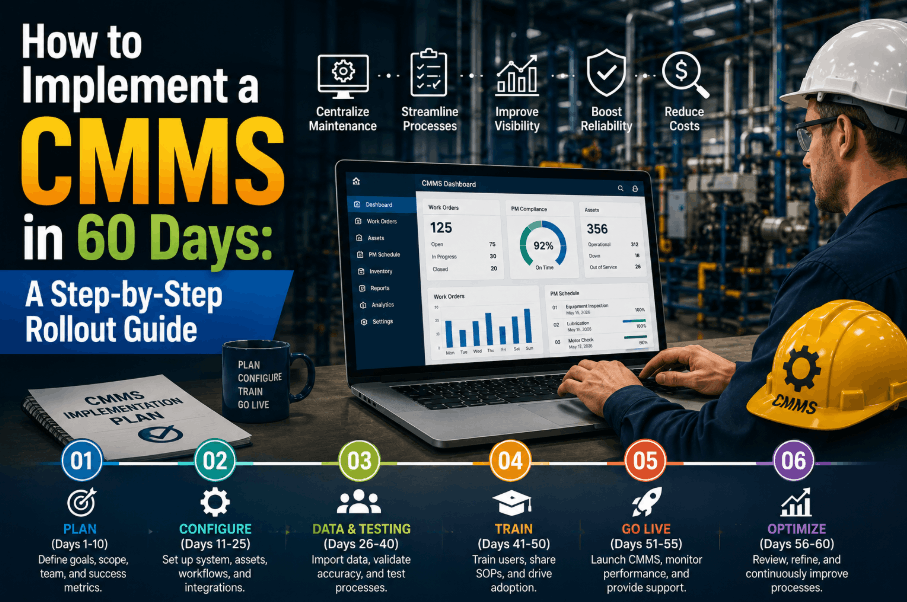
Most CMMS implementations fail — not because the software is wrong, but because the rollout is unplanned. Plants that succeed share one habit: they treat CMMS deployment as a structured 60-day project, not a software installation. This guide walks you through every phase of a fast, high-adoption CMMS rollout — from asset data preparation through go-live — using the same framework that maintenance teams use when Sign Up Free on Oxmaint and get running within weeks, not months. Whether you are migrating from spreadsheets or replacing a legacy system, the 60-day CMMS implementation timeline below is designed for manufacturing plants that cannot afford a six-month IT project.
Oxmaint is built for fast deployment — mobile-first, no-code setup, and onboarding support included. Get your PM programme live in weeks.
Why a 60-Day CMMS Implementation Timeline Works
Sixty days is not arbitrary — it maps to the natural rhythm of a plant's work cycle. Long enough to migrate asset data properly and train your team. Short enough that momentum does not die before go-live. The plants that drag implementations past 90 days typically stall on data perfection rather than shipping a working system. Done right, 60 days delivers a fully operational CMMS with PM schedules running, work orders flowing, and your team using it daily.
Scope the asset register, define criticality tiers, assign implementation owner, and configure system settings. This is discovery — do not skip it.
Import asset hierarchy, load existing PM schedules, map spare parts to assets, and clean historical work order data for priority equipment.
Build PM task libraries, set up work order workflows, configure user roles and permissions, and activate mobile access for technicians.
Deliver role-based training: planners on scheduling, supervisors on KPI dashboards, technicians on mobile work order capture. Run parallel testing.
Cut over to live operations, monitor adoption daily, resolve open issues within 48 hours, and run your first weekly KPI review on real data.
Days 1–10: Foundation — Define Scope Before You Touch the Software
The number one reason CMMS rollouts overrun is that teams start configuring the system before they know what they are configuring it for. Days 1–10 are about decisions, not data entry. Teams that Book a Demo with Oxmaint before starting often use this session to map their current state and identify exactly what a 60-day timeline looks like for their site.
One person must own the rollout — typically a reliability engineer or maintenance supervisor. Shared ownership means no accountability. This person owns scope, timeline, and adoption metrics through Day 60.
You do not need every asset on Day 1. Define your critical tier (assets where failure directly stops production) and your managed tier. Start with critical assets — full asset register can expand post go-live.
Audit what PM documentation already exists — paper-based, spreadsheet, or legacy CMMS. Identify which schedules are current, which are outdated, and which need to be rebuilt from manufacturer specs.
Define what success looks like at Day 60: planned maintenance ratio target, schedule compliance target, and percentage of technicians using the mobile app daily. Without targets, you cannot declare success.
Days 11–25: Data Migration — Good Data In, Good Decisions Out
CMMS data migration is where most implementations slow down — because teams attempt to migrate everything perfectly before going live. The correct approach is minimum viable data: enough to run your PM programme and capture work orders from Day 1. You can enrich data over the first 90 days post-launch. Teams who Sign Up Free on Oxmaint benefit from structured import templates that eliminate the blank-page problem.
| Data Type | Priority | Minimum Viable Requirement | Enrich Post Go-Live |
|---|---|---|---|
| Asset Register | Critical | Asset ID, name, location, criticality tier | Full spec sheets, photos, warranty data |
| PM Schedules | Critical | Task description, interval, assigned role | Detailed task steps, estimated hours, spare parts list |
| Spare Parts | Important | Part number, description, stocking location | Min/max levels, vendor data, cost history |
| Work Order History | Optional | Not required at go-live | Last 12–24 months for MTBF baseline |
| User Accounts | Critical | Name, role, plant location, mobile access | Skills matrix, certifications |
Days 26–50: Configuration and Training — Where Adoption is Won or Lost
Configuration and training are not sequential — they overlap. As planners configure PM task libraries, technicians should be handling hands-on mobile training. This parallel approach compresses timelines without sacrificing quality. Maintenance teams that Book a Demo see how Oxmaint's mobile-first design dramatically reduces technician onboarding time — most field users are self-sufficient within two supervised shifts.
Create reusable PM task templates before assigning them to assets. One well-built task template attached to 40 assets of the same type saves hours of duplicate data entry and ensures consistency across the programme.
Planned Maintenance Ratio, Schedule Compliance, and open work order age should be visible on Day 1. If supervisors cannot see their KPIs immediately, the system loses credibility and adoption stalls at the management layer.
The fastest way to build technician confidence is to run training on actual plant assets and real PM tasks — not sandbox data. When a technician closes their first real work order in the system, adoption converts from compliance to habit.
Oxmaint includes onboarding support, PM template libraries, and mobile-ready work order management — everything your team needs to go live in 60 days.
Days 51–60: Go-Live Checklist — What to Verify Before You Cut Over
Go-live is not a single moment — it is a managed cut-over period. The week before going live, run your checklist. The week after, monitor adoption metrics daily. Teams that Sign Up Free on Oxmaint and use the mobile app from Day 1 see significantly higher 30-day retention because the system integrates into daily workflow immediately rather than sitting unused until the next planning cycle.
- All critical assets loaded with correct location hierarchy
- First 30 days of PM work orders generated and assigned
- All technician mobile accounts active and tested
- Work order approval workflows verified end-to-end
- KPI dashboard accessible to all supervisors
- Spare parts linked to at least critical-tier assets
- Parallel run completed — paper vs system for one week
- Daily active user count tracked and reported
- First weekly KPI review run on live data
- Open issues log reviewed and resolved within 48 hours
- PM compliance rate for Week 1 calculated
- Work orders from reactive calls being captured in system
- Supervisor sign-off on dashboard accuracy
- 30-day adoption review scheduled
The Three Adoption Killers — and How to Avoid Them
Teams that delay go-live until all asset data is complete never go live. Minimum viable data gets you to adoption — enrichment happens naturally as technicians use the system daily. Launch with 80% data quality; you will reach 95% within 60 days of use.
If supervisors are not actively checking PM compliance in the CMMS weekly, technicians quickly learn the system is optional. Assign each supervisor a weekly compliance review — and make the output visible to plant management. Visibility drives behaviour.
Running paper-based PM tracking alongside the new CMMS beyond two weeks is a guarantee of non-adoption. Set a hard cutover date. When technicians know the paper system is ending, digital adoption accelerates sharply in the final week before go-live.
CMMS Implementation — Questions Maintenance and Operations Leaders Ask
A focused rollout with a dedicated implementation owner takes 45–60 days for a mid-size plant with 500–2,000 assets. Larger multi-site deployments run 90–120 days. Plants that attempt to implement without a dedicated owner typically take 6–12 months. Use Oxmaint's structured onboarding to stay on the 60-day track — Book a Demo to see the onboarding process.
No. Historical work order migration is optional at go-live. You need your asset register, PM schedules, and user accounts. Historical data can be imported over the first 60–90 days post-launch or maintained as a read-only archive from the previous system.
Low technician adoption. A perfectly configured CMMS that technicians do not use produces no value. The fix is mobile-first design, hands-on training with real work orders, and a hard cutover date that eliminates parallel paper systems. Oxmaint's mobile app is built specifically for field technician adoption.
Phase implementation so data migration and configuration happen off-shift or with a dedicated project resource. Technician training runs in 2–4 hour role-specific sessions, not full-day workshops. The go-live week needs supervisor attention — schedule it during a lower-production period if possible.
Focus on three: daily active users (adoption), PM schedule compliance (programme health), and percentage of work captured as planned vs reactive. These three metrics together tell you whether your rollout has succeeded operationally — not just technically. Sign Up Free to see these dashboards live.
Yes. Oxmaint is designed for fast deployment — no-code asset setup, mobile-ready from Day 1, and structured onboarding support. Most plants are running live PM work orders within 30 days of account creation. Book a Demo to map your 60-day implementation plan with our team.
Oxmaint gives your maintenance team structured onboarding, mobile work orders, PM scheduling, and KPI dashboards — everything needed to go live fast and drive real adoption from Day 1.
-in-manufacturing.png)
.png)


.png)