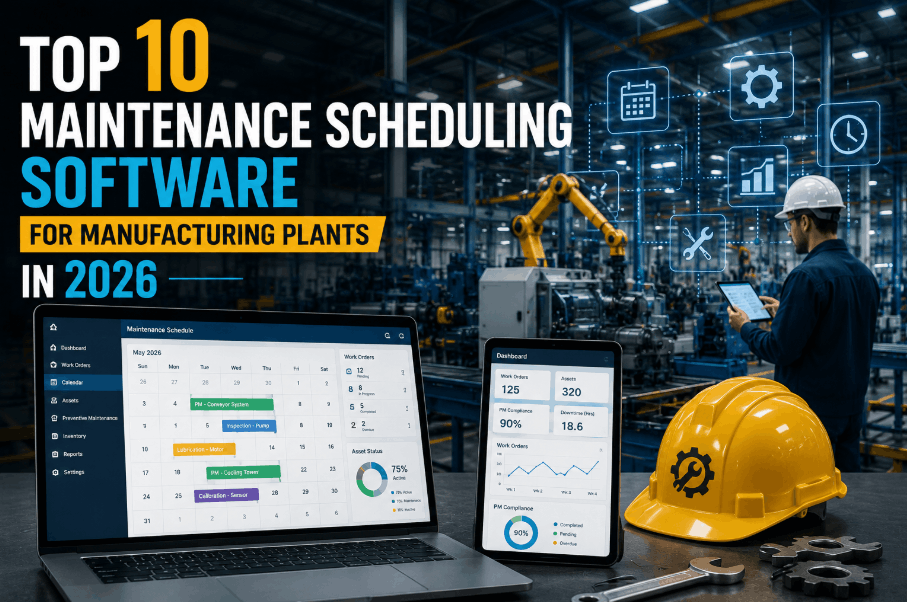
Manufacturing plants run on uptime — and uptime runs on scheduling. Without a structured Sign Up Free maintenance scheduling system, even well-staffed teams default to reactive firefighting: chasing breakdowns, missing PMs, and losing thousands of dollars per hour in unplanned downtime. The right maintenance scheduling software for manufacturing plants puts every work order, inspection, and resource on a unified calendar — automating PM triggers, syncing technician availability, and giving plant managers live visibility into what's happening on the floor. Whether you need a basic CMMS scheduler for a single site or an enterprise-grade maintenance planner across 20+ facilities, this ranked comparison of the top 10 maintenance scheduling tools in 2026 covers features, manufacturing fit, integration depth, mobile UX, and total cost of ownership so your team can make the right call. Book a Demo to see how OxMaint fits your plant environment before diving into the comparison.
Automate Your Plant Maintenance Scheduling in Minutes
OxMaint gives manufacturing teams automated PM scheduling, work order management, and real-time technician tracking — with zero setup complexity and a free tier to prove value fast.
What Makes Maintenance Scheduling Software Essential for Manufacturing
Manufacturing environments demand scheduling precision that generic task tools can't provide. CMMS scheduling software built for plants handles cycle-based PM triggers, multi-shift technician dispatch, equipment downtime windows, parts availability checks, and compliance documentation — all in a single workflow. These are the core capabilities that separate purpose-built maintenance planners from spreadsheets and generic project tools.
Schedule PMs by calendar interval, runtime hours, cycle counts, or sensor readings — not manual reminders. Critical for continuous-process manufacturing lines.
Generate, assign, and track corrective and preventive work orders with priority queuing, technician availability matching, and escalation rules.
Schedule maintenance around production shifts without conflicts — with shift handover notes, crew assignment, and real-time job status updates.
Link scheduled PMs to required spare parts — triggering reorder alerts before jobs run short and preventing last-minute sourcing delays.
Auto-schedule mandatory regulatory inspections — ISO, OSHA, EPA — with audit-ready documentation generated on completion.
Technicians receive scheduled jobs on mobile, log time and materials on-site, capture photo evidence, and close work orders without paperwork.
Top 10 Maintenance Scheduling Software for Manufacturing Plants in 2026
Each platform below is ranked by manufacturing fit, scheduling capability, ease of use, integration ecosystem, and total cost of ownership. Book a Demo with OxMaint to benchmark your specific plant requirements against the field.
OxMaint is purpose-built for asset-intensive operations. Its automated PM scheduling engine supports calendar, meter, and condition-based triggers across unlimited assets and sites. Work orders are generated, assigned, and escalated automatically — with real-time technician dashboards, mobile-first execution, and compliance-aligned inspection templates built in. Manufacturing plants get industry-specific features like cycle-count PMs, production downtime scheduling windows, and multi-site fleet visibility from day one — not after months of custom configuration.
MaintainX offers a clean, mobile-first work order and PM scheduling platform popular with frontline maintenance teams. Its scheduling interface is straightforward, with recurring PM setup, technician assignments, and checklist attachment. Lacks deep manufacturing-specific features like cycle-count triggers and production downtime integration, but strong for teams prioritizing rapid adoption.
UpKeep targets smaller maintenance teams with an intuitive work order interface and basic recurring PM scheduling. Good entry point for plants moving off paper-based systems, but limited advanced scheduling logic — no cycle-count triggers, no production window integration, limited multi-site reporting.
Fiix delivers solid CMMS scheduling features with strong ERP and IoT integration capabilities, benefiting plants already inside the Rockwell ecosystem. Scheduling setup requires configuration effort, and the interface is more complex than modern alternatives. Best suited for larger operations with dedicated IT resources.
Limble offers a clean UI and fast onboarding cycle with automated PM scheduling, work request portals, and basic reporting. Popular with mid-size manufacturers for its simplicity. Scheduling depth and multi-site fleet management are less mature than OxMaint or Fiix at comparable price points.
Maximo remains the gold standard for large enterprise asset management with deep scheduling, reliability-centered maintenance (RCM), and regulatory compliance workflows. The trade-off: implementation takes months, costs are high, and agility is limited. Suitable for organizations with dedicated IT and a long implementation runway.
eMaint by Fluke offers a highly configurable CMMS scheduling system with strong reporting and multi-site support. The flexibility is a double-edged sword — configuration demands significant setup time. Better suited to organizations with maintenance engineers who can own the implementation.
Hippo offers an accessible scheduling interface suited to facilities teams but lighter on manufacturing-specific workflows. Cycle-count PM triggers and production integration are absent. Better positioned for commercial real estate and light facilities than heavy manufacturing environments.
ManagerPlus covers both fleet and fixed-asset maintenance scheduling — useful for manufacturers who also manage vehicle and equipment fleets. Scheduling capabilities are solid but the UI is aging, and modern UX expectations may not be met for field technician adoption.
Fracttal targets asset-intensive industries with IoT-connected maintenance scheduling and strong multi-language support. Growing adoption in Latin American manufacturing markets. Feature depth in North American regulatory compliance and ERP integration lags behind leaders in this ranking.
Head-to-Head Comparison: Top Maintenance Scheduling Software 2026
| Capability | OxMaint | MaintainX | UpKeep | Fiix | Limble | IBM Maximo | eMaint |
|---|---|---|---|---|---|---|---|
| Automated PM scheduling | Yes | Yes | Yes | Yes | Yes | Yes | Yes |
| Cycle-count PM triggers | Yes | Limited | No | Yes | Limited | Yes | Yes |
| Multi-shift scheduling | Yes | Limited | No | Yes | No | Yes | Yes |
| Multi-site fleet view | Yes | Limited | Limited | Yes | Limited | Yes | Yes |
| Mobile-first field app | Yes | Yes | Yes | Yes | Yes | Limited | Yes |
| Compliance inspection scheduling | Yes | Limited | No | Limited | No | Yes | Yes |
| Parts inventory integration | Yes | Limited | Yes | Yes | Limited | Yes | Yes |
| Setup complexity | Minutes | Hours | Hours | Days | Hours | Months | Days |
| Free tier available | Yes | No | No | No | No | No | No |
How to Choose the Right Maintenance Scheduling Software for Your Plant
Define Your PM Trigger Requirements
If your equipment runs on cycles or runtime hours — not just calendar time — you need meter and cycle-count PM triggers. Verify these are native, not add-ons.
Assess Multi-Site and Fleet Scope
Single-plant tools fail fast when you add sites. Choose a platform with native multi-site scheduling, cross-site reporting, and site-level permissions from day one.
Evaluate Mobile Technician UX
The best scheduling engine fails if technicians don't use it. Test the mobile app in your actual floor environment — offline mode, QR scanning, and photo capture are non-negotiable.
Calculate Total Cost of Ownership
Per-user pricing scales painfully in large teams. Evaluate per-asset or flat-tier pricing models — and factor in implementation, training, and integration costs before committing.
Check Compliance Coverage
If your plant operates under ISO, OSHA, EPA, or industry-specific mandates, verify that inspection scheduling and audit documentation are native — not custom-built workarounds.
Measure Time-to-Value
A system that takes months to implement delays ROI. Prioritize platforms with pre-built manufacturing templates and same-day go-live potential. Sign Up Free and be running in under an hour.
OxMaint for Manufacturing: Core Scheduling Capabilities
OxMaint is built from the ground up for asset-intensive environments. Unlike generic work order tools, OxMaint's scheduling engine understands manufacturing maintenance — connecting PM frequency to actual equipment usage, coordinating work around production shifts, and maintaining compliance documentation automatically. Book a Demo to see a live manufacturing plant configuration, or Sign Up Free and import your asset list today.
Results Manufacturing Plants Achieve with OxMaint
Switch from Spreadsheets to Automated Plant Scheduling
OxMaint's manufacturing-ready CMMS goes live in minutes — pre-built PM templates, mobile technician app, multi-site dashboard, and a free tier to start without budget risk.
Frequently Asked Questions
What is maintenance scheduling software for manufacturing?
It is a CMMS platform that automates preventive maintenance schedules, work order dispatch, technician assignment, and compliance tracking for manufacturing plant assets — replacing spreadsheets and manual planners.
How does OxMaint differ from general CMMS tools?
OxMaint includes manufacturing-specific scheduling features — cycle-count PM triggers, production downtime windows, multi-shift coordination, and compliance inspection templates — that generic tools require months of custom configuration to replicate.
Can maintenance scheduling software integrate with ERP systems?
Yes. OxMaint supports API integrations with major ERP and SCADA platforms, enabling work order data, parts consumption, and asset history to sync without manual re-entry.
How quickly can a manufacturing plant go live with OxMaint?
Most plants are live within hours — asset import from spreadsheets, pre-built PM templates, and mobile app deployment require no IT resources or lengthy implementation projects.
Is there a free maintenance scheduling software for manufacturing?
OxMaint offers a free tier with core scheduling and work order management — the only top-ranked platform in this list with a free manufacturing-ready plan. Sign Up Free to get started.
What PM trigger types do manufacturing plants need?
Manufacturing assets typically need calendar-based, meter/runtime-based, and cycle-count triggers — plus condition-based alerts from IoT sensors. OxMaint supports all four natively. Book a Demo to review trigger configuration for your asset types.
Ready to See OxMaint in Your Plant Environment?
Join hundreds of manufacturing teams using OxMaint to automate PM scheduling, cut unplanned downtime, and maintain compliance across every asset and every site.
-in-manufacturing.png)
.png)

.png)