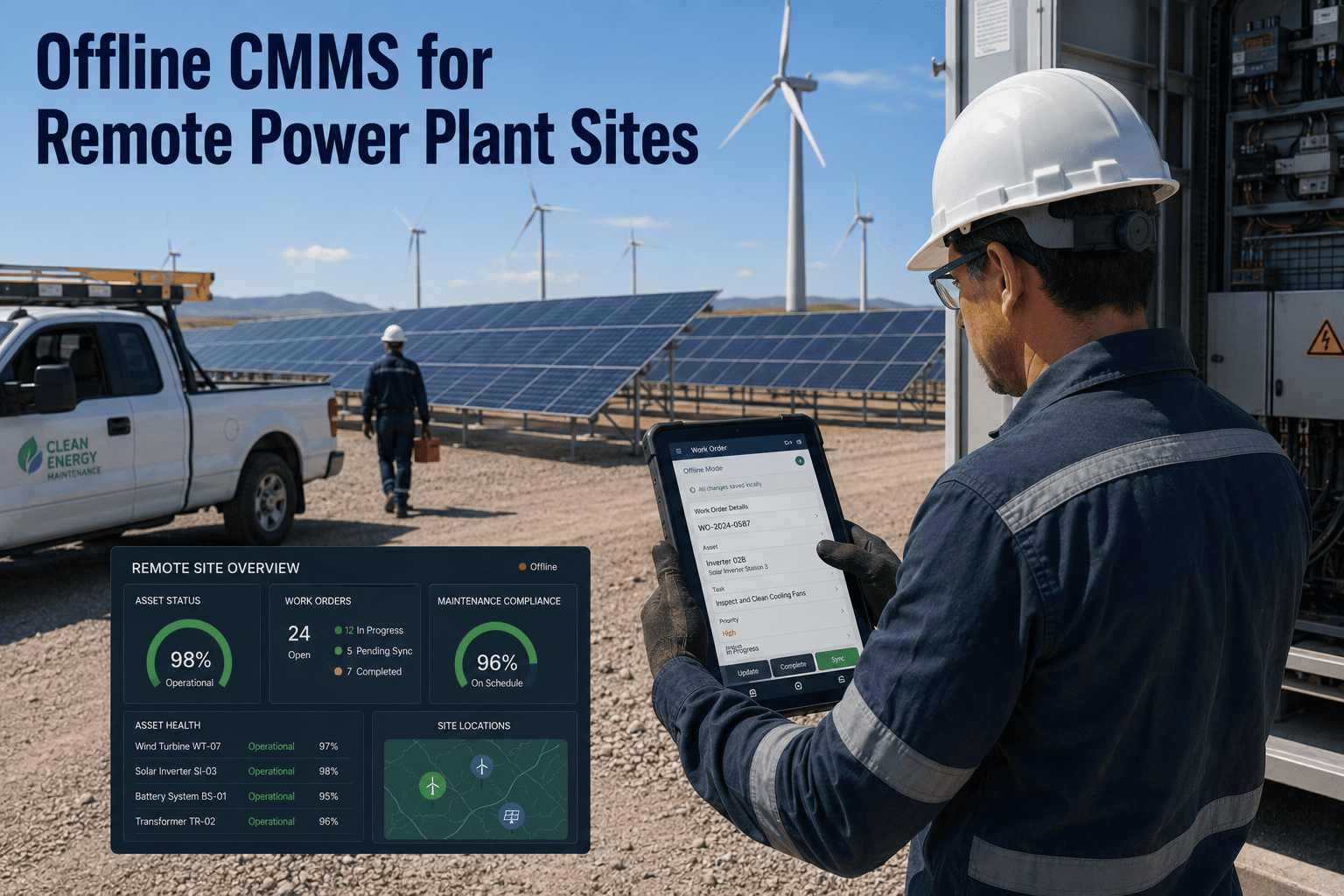
When your wind farm technician drives two hours to a remote turbine site, opens their laptop, and discovers the maintenance app won't load because there's no cell signal — that's not a minor inconvenience. That's a $4,000 wasted trip. Remote power generation sites — hydro dams in mountain valleys, wind farms on rural ridges, solar arrays in desert corridors — operate in connectivity dead zones by design. Yet most CMMS platforms still assume constant internet access. An offline-first CMMS eliminates that dependency entirely: technicians access full asset histories, complete inspection checklists, and close work orders on-site with zero connectivity, then sync everything when they return to network coverage. Power companies using offline CMMS report 89% first-visit completion rates at remote sites compared to 51% with cloud-only systems. Start a free trial to see how Oxmaint's offline mode works on your remote assets.
What Is Offline CMMS — And Why Remote Power Sites Need It
An offline CMMS is a maintenance management system that operates without continuous internet connectivity. Unlike cloud-only platforms that freeze or fail when network access drops, offline-capable CMMS applications store critical asset data, work orders, inspection forms, and equipment histories directly on mobile devices. Technicians access everything they need on-site — even in complete connectivity dead zones — then sync all changes back to the central database when they return to network coverage.
For remote power generation facilities, offline functionality is not a convenience feature — it is an operational requirement. Hydro plants in mountain canyons, wind farms on rural hilltops, and solar arrays in desert regions frequently operate beyond reliable cellular or Wi-Fi range. A maintenance system that depends on constant connectivity creates a forced choice: delay work until network access is available, or complete inspections on paper and re-enter everything manually later. Offline CMMS eliminates both failure modes by making the mobile device the single source of truth during field operations. Teams managing distributed renewable portfolios report that offline access increases same-day work order closure rates by 42% and reduces duplicate data entry time by 78%. Book a demo to walk through sync workflows with our team.
Six Essential Features of Offline CMMS for Remote Power Plants
Not all offline modes are built equally. The most effective offline CMMS platforms for power generation deliver these six capabilities without requiring constant connectivity.
Technicians view complete maintenance records, past work orders, parts replacement history, and failure logs for every asset — even when offline. No partial data, no "sync required" placeholders.
Pre-loaded inspection forms with photos, dropdown menus, condition scoring, and signature capture work fully offline. Inspections completed in the field sync automatically when connectivity returns.
Technicians create new work orders, update task status, log labor hours, and close completed jobs without network access. All changes queue locally and upload when online.
Capture high-resolution photos, annotate images, and attach PDF documentation to assets or work orders while offline. Media files sync in background when bandwidth becomes available.
Check parts availability, record consumption, and flag reorder triggers from remote sites. Inventory transactions process offline and reconcile with central stock records during next sync.
When connectivity returns, the CMMS syncs all offline changes automatically without manual intervention. Conflict resolution handles overlapping edits from multiple technicians seamlessly.
Four Problems Cloud-Only CMMS Creates at Remote Power Sites
Power companies operating distributed renewable portfolios encounter these failures repeatedly when maintenance systems require constant connectivity.
Technicians arrive at remote turbines or solar inverters, discover they cannot access work order details or inspection checklists, and return without completing the job. Each failed trip costs $3,000–$5,000 in labor and travel.
Without offline access, field teams revert to paper forms and manual notes. Every inspection, measurement, and observation must be transcribed into the CMMS later — doubling administrative time and introducing transcription errors.
When technicians cannot access asset histories or parts availability on-site, they cannot make real-time repair decisions. Issues that could be resolved immediately become multi-visit jobs requiring additional scheduling and travel.
Regulatory inspections at hydro dams and wind farms require timestamped, photo-documented records. Cloud-only systems that fail during inspections create compliance gaps that auditors flag as violations — triggering fines or operational restrictions.
Most remote power sites lose 15–25% of scheduled maintenance productivity to connectivity failures when using cloud-dependent CMMS platforms. Start a free trial to eliminate those losses with Oxmaint's offline-first mobile app.
How Oxmaint Delivers Full CMMS Functionality Without Connectivity
Oxmaint's offline mode is purpose-built for remote power generation operations. Here is how the platform ensures technicians have everything they need — regardless of network availability.
Before leaving the office, technicians sync their assigned work orders and related assets to their mobile devices. All equipment histories, inspection protocols, and parts lists download completely — ready for offline use.
Oxmaint's mobile app maintains a full local database on the device. Every work order update, photo upload, and inspection entry saves locally first, then syncs to the cloud when connectivity becomes available.
When multiple technicians work on the same asset offline, Oxmaint's sync engine merges changes intelligently. Timestamps, user IDs, and field-level versioning prevent data loss or overwrites during synchronization.
Photos, PDFs, and large inspection reports queue for background upload when bandwidth is limited. Technicians continue working while media files sync automatically in the background without blocking other operations.
The mobile app detects Wi-Fi vs cellular connections and adjusts sync behavior accordingly. Large media uploads wait for Wi-Fi, while critical work order updates sync immediately over any available connection.
Custom inspection checklists with conditional logic, photo requirements, and digital signatures function fully offline. All form logic processes locally — no server calls needed during inspections.
Cloud-Only vs Offline CMMS — Remote Site Performance Metrics
These operational differences emerge when power companies transition from cloud-dependent CMMS platforms to offline-capable systems like Oxmaint.
| Operational Metric | Cloud-Only CMMS | Offline CMMS (Oxmaint) |
|---|---|---|
| First-visit completion rate at remote sites | 51% — technicians lack data access | 89% — full asset history available offline |
| Data entry duplication | High — paper forms transcribed later | Zero — all entries digital from start |
| Average failed trip cost | $4,200 per wasted visit | Eliminated — work completes on first visit |
| Time to close work orders post-visit | 2–5 days — manual data entry delays | Same day — syncs automatically upon return |
| Compliance documentation gaps | Frequent — missing timestamps and photos | Zero — all inspections timestamped offline |
| Mobile productivity at remote sites | 65% — connectivity failures block work | 100% — no dependency on network access |
Measurable Outcomes from Offline CMMS Deployment
Power companies managing distributed renewable portfolios report these improvements after deploying offline-capable CMMS platforms.
A single prevented repeat visit to a remote wind turbine typically saves $3,200–$4,800 in combined travel, labor, and scheduling costs — covering monthly CMMS costs for an entire site. Book a demo and we will model savings based on your current remote site visit patterns.
Offline CMMS for Remote Power Plants — Answered
How much data can technicians access offline?
What happens if two technicians edit the same asset offline?
Can technicians create emergency work orders while offline?
Does offline mode work on both iOS and Android devices?
Deploy Offline CMMS at Your Remote Power Sites in 14 Days
Oxmaint's offline-first mobile platform eliminates the forced choice between network dependency and paper forms. Your technicians get full CMMS functionality — asset histories, work orders, inspection checklists, parts tracking — regardless of cellular coverage or Wi-Fi availability.