In healthcare facilities, a single unaddressed trip hazard can result in patient falls, visitor injuries, staff accidents, and immediate Joint Commission citation — yet most hospitals still rely on paper rounds, verbal reports, and email chains to flag and resolve these risks. OxMaint's healthcare CMMS transforms trip hazard response from a reactive paper process into a structured digital workflow: hazards are reported instantly via mobile, routed to the right technician automatically, escalated if unresolved, and closed with photographic evidence attached — all creating a compliance-ready audit trail. Facilities using structured hazard response workflows reduce fall-related incidents by 34% and cut average hazard-to-resolution time from 4.2 hours to under 45 minutes. With CMS Conditions of Participation and Joint Commission Environment of Care standards tightening, a documented, timestamped response process is no longer optional — it is the difference between a corrective action plan and a clean survey. Book a demo to see how OxMaint closes the gap between hazard identification and verified resolution.
Healthcare · Safety & Environment of Care · CMMS Workflow
Trip Hazard Response Workflow for Healthcare Facilities
From floor hazard spotted to work order closed — with escalation, routing, photo proof, and compliance records. Built for hospital safety teams.
34%
Reduction in fall-related incidents with structured hazard workflow
45 min
Average hazard-to-resolution time vs. 4.2 hrs without CMMS
92%
Of EOC deficiencies are repeat findings due to missing audit trail
$37K
Average cost per hospital slip-and-fall claim (CNA Healthcare Study)
End-to-End Workflow
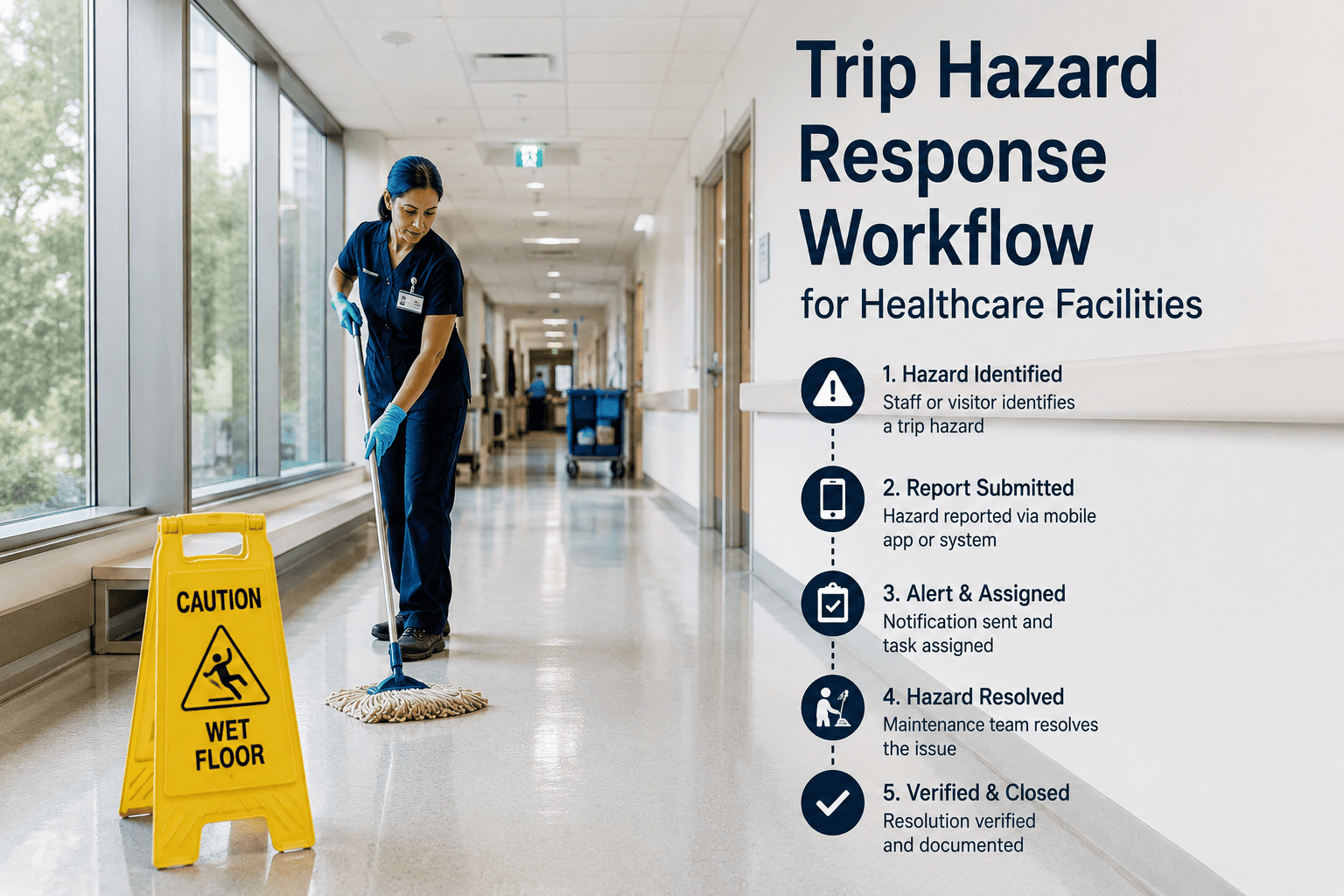
How OxMaint Handles a Trip Hazard — Step by Step
Every step is timestamped, assigned, and logged — creating an unbroken chain of evidence from hazard report to verified close.
01
Hazard Reported via Mobile
Staff scan a QR code or use OxMaint's mobile app to report the hazard with location, description, and photo — no paper, no call center delay. Report is timestamped and enters the system immediately.
02
Priority Classification & Routing
OxMaint classifies hazard severity (immediate threat vs. monitor) and routes the work order to the appropriate technician or team based on location, shift, and skill set — automatically.
03
Technician Dispatched with Context
The assigned technician receives full context: hazard type, location map, photo from reporter, and any asset history for that area. No second trip to get missing information.
04
Escalation if SLA Breached
If the work order is not acknowledged within your defined SLA window (e.g., 15 minutes for high-risk hazards), OxMaint automatically escalates to the supervisor and safety officer — no manual follow-up needed.
05
Resolution with Photo Evidence
Technician closes the work order with an after-repair photo, notes, and time of completion. The full record — report to resolution — is stored and retrievable for any audit or incident review.
See the Full Workflow Running Live
Our team will walk you through a live trip hazard scenario in OxMaint — from mobile report to escalation to compliance evidence — in 30 minutes.
Before vs. After
Paper Process vs. OxMaint Workflow
| Process Step |
Without CMMS (Paper/Email) |
With OxMaint |
Impact |
| Hazard Report |
Verbal or paper form — often delayed 20–60 min |
Mobile QR scan — instant with photo |
Faster detection |
| Task Assignment |
Supervisor calls around to find available tech |
Auto-routed by location and shift schedule |
Eliminates dispatch delay |
| Escalation |
Manual follow-up call if unresolved |
Auto-escalation at configurable SLA threshold |
No hazard falls through |
| Compliance Evidence |
Paper log — easily lost, incomplete |
Timestamped digital record with before/after photos |
Audit-ready at all times |
| Resolution Tracking |
No closed-loop confirmation |
Technician closes with signature and photo |
Full accountability chain |
| Recurring Hazard Analysis |
No data — patterns invisible |
Dashboard shows repeat locations and root causes |
Proactive risk elimination |
Compliance Coverage
Regulatory Standards OxMaint Supports
JC
Joint Commission EC.02.06.01
Documents environment of care inspection findings, corrective action, and verified resolution with timestamped evidence.
CMS
CMS Conditions of Participation
Supports physical environment maintenance standards with traceable hazard-to-resolution audit records per survey requirement.
OS
OSHA 29 CFR 1910.22
Maintains walking-working surface records and provides documented evidence of hazard identification and abatement timelines.
DN
DNV GL Healthcare Standards
Continuous survey readiness with real-time hazard tracking, corrective maintenance logs, and leadership KPI visibility.
Expert Review
Why Healthcare Facilities Fail EOC Inspections on Trip Hazards
The most common reason a healthcare facility receives a repeat trip hazard finding is not that the hazard wasn't fixed — it's that there's no evidence it was fixed, no documentation of when it was reported, who responded, and how long it took. Joint Commission surveyors specifically look for closed-loop processes: report, assignment, resolution, and verification. When that chain exists only in someone's memory or a paper binder, it doesn't exist for survey purposes. A CMMS-driven workflow doesn't just speed up resolution — it converts every response into defensible compliance documentation that can survive any audit.
KPI Dashboard
Metrics Your Safety Team Gets Out of the Box
Mean Time to Acknowledge
MTTA
Average time from hazard report submission to technician acknowledgment, by unit and shift
Mean Time to Resolve
MTTR
Average hazard-to-close time segmented by hazard type, location, and priority level
Escalation Rate
ESC%
Percentage of hazard work orders that breached SLA and required supervisor escalation
Repeat Hazard Locations
RHL
Identifies floor zones or corridors with recurring trip hazard reports for proactive infrastructure review
Common Questions
Frequently Asked Questions
How does OxMaint handle hazard reports submitted outside business hours?
OxMaint operates 24/7 — reports submitted at any hour are immediately logged, timestamped, and routed based on your on-call schedule and escalation rules. High-priority hazards can trigger immediate SMS or push notifications to the on-call technician and safety supervisor. No hazard waits until morning shift.
Sign up and configure your after-hours escalation rules.
Can staff report hazards without installing an app or having an OxMaint account?
Yes. OxMaint supports QR code-based hazard reporting that any staff member can access from their smartphone browser — no app download, no login required. The QR code can be placed at nursing stations, on lanyards, or posted in corridors. The report still captures location, description, and photo, and feeds directly into the CMMS work order queue.
See the QR reporting setup in a live demo.
What evidence does OxMaint generate for Joint Commission survey preparation?
For every hazard work order, OxMaint generates: a timestamped initial report with reporter identity, classification log showing priority assignment, technician dispatch record with acknowledgment time, before and after photos, resolution notes, and a total elapsed time summary. This package is exportable as PDF or available in the CMMS dashboard for any surveyor review.
Start free and explore the compliance report exports.
How are escalation thresholds configured in OxMaint?
Escalation SLAs are configurable per hazard priority level. For example: high-risk trip hazards (wet floors, damaged thresholds near patient areas) can be set to escalate within 15 minutes of non-acknowledgment; low-risk cosmetic issues can have a 4-hour threshold. Escalation chains can include the area supervisor, safety officer, and facility director in sequence.
Talk to our team about your escalation workflow requirements.
Does OxMaint support preventive rounds to proactively identify trip hazards?
Absolutely. OxMaint's preventive maintenance module supports scheduled rounding checklists where technicians inspect corridors, thresholds, flooring, and transition strips on a defined frequency. Findings from rounds create work orders automatically, ensuring proactive hazards are tracked and resolved through the same closed-loop workflow as reactive reports.
Sign up and set up your first rounding schedule.
Healthcare CMMS · Trip Hazard Workflow · Compliance Ready
Stop Relying on Paper to Protect Patients and Surveys
OxMaint gives your safety team a real-time, mobile-first workflow for every trip hazard — with escalation, routing, photo evidence, and audit-ready reports built in from day one.


.jpg)
