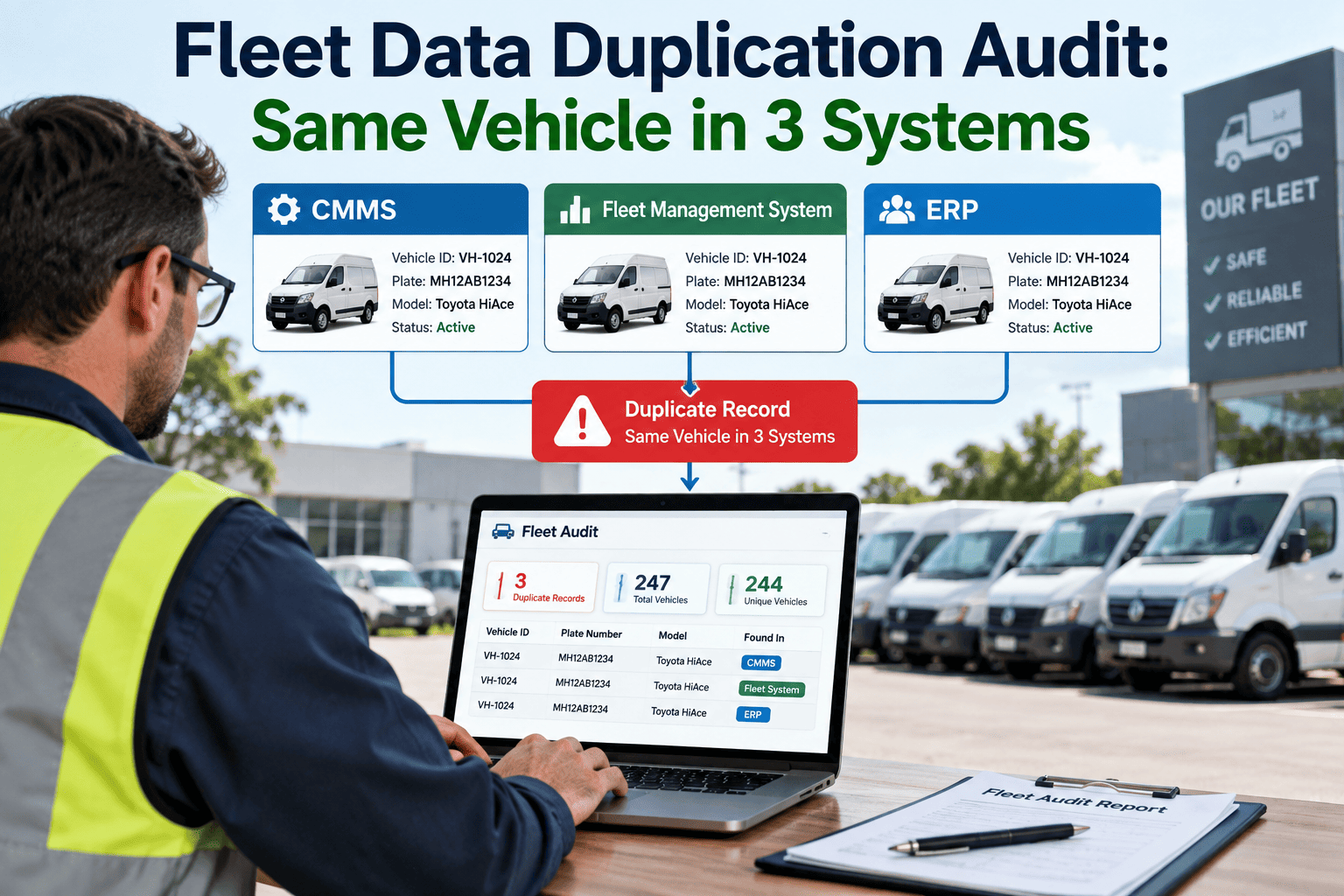
Ask a fleet manager how many vehicles they operate and they'll give you a confident number. Ask their finance team, their insurance broker, and their telematics provider the same question, and you'll often get three different answers — because the same truck exists as three separate records across three systems, entered by three different people at three different times, none of whom knew the others had already created an entry. Nobody notices until an insurance audit fails to reconcile, a depreciation schedule misses a vehicle, or a maintenance cost gets logged against the wrong asset entirely. A duplication audit finds these before they cost real money. Sign in to OxMaint to run one against your own fleet records.
Data Quality · Duplicate Records · VIN Audit · OxMaint
The Same Vehicle, Three Systems, Three Different Records — and Nobody Assigned to Notice
A structured duplication audit compares vehicle identity across your maintenance, finance, and telematics systems, surfacing every VIN that exists more than once before it costs you an audit failure or a misallocated repair cost.
Three Ways the Same Vehicle Ends Up Duplicated
Cause 1
Different Identifiers Across Systems
Maintenance tracks a vehicle by VIN, dispatch tracks it by unit number, and finance tracks it by asset tag. Without one identifier mapped consistently across all three, the same truck is entered fresh in each system rather than linked as one record.
Cause 2
Re-Entry After a Transfer or Reassignment
A vehicle moved between terminals, business units, or lease entities is often re-entered as a new asset at the receiving location rather than updated on the existing record, leaving the old entry active and unreconciled.
Cause 3
Manual Import Without Deduplication Rules
Spreadsheet imports and telematics integrations that don't check for an existing VIN match before creating a new record are the single most common source of duplicate entries in growing fleets.
Running the Audit: A Five-Step Process
1
Export the full vehicle list from every system that holds an asset record — maintenance, finance, insurance, telematics — with VIN as a required field in each export.
2
Normalize the VIN field across exports, correcting for case differences, stray spaces, and the occasional transposed character from manual entry.
3
Match records across systems on the normalized VIN and flag any VIN appearing more than once within the same system, or missing entirely from one of the others.
4
For each flagged VIN, determine which record is authoritative — usually the one with the most complete and recently updated history — and mark the other for merge or retirement.
5
Merge the maintenance, cost, and inspection history into the authoritative record before retiring the duplicate, so no service history is lost in the cleanup.
Small Fleets Are Not Immune
It's tempting to treat duplication as a large-fleet problem, but a fifteen-vehicle operation with a maintenance app, a separate spreadsheet for insurance, and a telematics dashboard from a third vendor has exactly the same three-system fragmentation as a thousand-vehicle carrier — just at a smaller scale where the cost per error is proportionally higher relative to the size of the operation. A single duplicated vehicle in a fifteen-unit fleet distorts a per-vehicle cost average far more than the same error would in a larger fleet where it gets diluted across hundreds of other records.
What Duplication Actually Costs a Fleet
Insurance Audit Mismatches
A policy reconciliation that expects one vehicle count and finds the fleet's internal system reporting a different number, because duplicate or orphaned records inflate or split the total, routinely triggers a manual review that delays renewal.
Split Maintenance History
A repair logged against the duplicate record instead of the original means the vehicle's real service history understates its true repair frequency — which quietly skews replace-versus-repair decisions for that asset.
Depreciation and Disposal Gaps
A vehicle disposed of in one system but never removed from another continues to depreciate on the books and can even reappear in a compliance report as an active asset requiring an inspection that will never happen.
Wrong-Asset Cost Allocation
Fuel, toll, and maintenance costs entered against the wrong instance of a duplicated vehicle distort cost-per-mile figures for both the correct asset and the phantom one sitting alongside it.
| Symptom | Likely Cause | Audit Check |
|---|---|---|
| Vehicle count differs by system | Duplicate or orphaned record | Cross-system VIN match |
| Maintenance cost looks unusually low | Repairs split across two records | History merge check |
| Disposed vehicle still flagged for inspection | Retirement not propagated | Active-status reconciliation |
| Two records, one VIN, different mileage | Manual re-entry after transfer | VIN-to-mileage consistency check |
Duplication Is Invisible Until Someone Audits for It
A duplicate record doesn't throw an error. It just sits there, quietly splitting a vehicle's history across two entries, until a report doesn't add up and someone has to manually trace why.
Preventing Duplication After the Cleanup
Reject Duplicate VINs at Entry
The most durable fix is structural — a system that refuses a new record when the VIN already exists, forcing a transfer or update to the existing asset instead of a fresh entry.
One Authoritative Asset Record
Driver assignments, telematics data, maintenance events, and financial figures should all reference the same underlying vehicle record rather than separate exports reconciled by hand after the fact.
Scheduled Reconciliation, Not One-Time Cleanup
A single audit fixes today's duplicates. A recurring quarterly check catches the new ones that creep back in through imports, transfers, and manual entry before they accumulate again.
Signs Your Fleet Data Already Has a Duplication Problem
Two Different Vehicle Counts in Routine Reports
If a monthly compliance report and a monthly cost report from two different systems never quite agree on the total number of active vehicles, and the gap isn't explained by vehicles genuinely acquired or disposed of that month, duplication is the most common explanation.
A Vehicle's Mileage Looks Like It Went Backward
Odometer readings that appear to drop between service visits usually mean two records are being updated independently for what is actually one physical vehicle, with mileage entered against whichever record happened to be open at the time.
Staff Manually Cross-Check Records Before Trusting Them
If your team has an informal habit of double-checking a vehicle's status in a second system before making a decision, that's a strong signal that trust in the primary system has already eroded because of past duplication or sync issues.
We found fourteen vehicles that existed twice in our own systems during our first audit — three of them had been sold over a year earlier and were still showing up as active assets due for annual inspection. Nobody had done anything wrong; the systems just never talked to each other. Fixing it took an afternoon. Not knowing about it had been costing us a compliance flag every quarter for over a year.
— Fleet Operations Manager, Municipal Fleet, 210 Units
Fitting the Audit Into a Workflow People Will Actually Follow
Assign One Owner, Not a Committee
A duplication audit that's "everyone's responsibility" tends to become no one's responsibility. Naming a single data owner — usually whoever administers the maintenance system — keeps the quarterly check from quietly slipping off the calendar.
Trigger It Off Events, Not Just a Calendar
Beyond the quarterly schedule, treat any bulk import, telematics integration, merger, or system migration as an automatic trigger for a duplication check, since these are exactly the events that introduce the most new duplicate records at once.
Keep a Log of What Was Merged
Recording which records were merged, when, and by whom creates an audit trail of its own — useful the next time a finance or insurance reconciliation asks why a vehicle count changed between two reporting periods.
A Clean Vehicle Registry Is a Foundation, Not a One-Time Project
The fleets that stay clean long-term are the ones that pair a periodic audit with a system that refuses to create the duplicate in the first place, rather than relying on the audit alone to catch every new one.
Frequently Asked Questions
How often should a fleet run a duplication audit?
Quarterly is typical for fleets over fifty vehicles, or immediately after any bulk import, merger, or system migration where large batches of records are added at once.
Which record should be treated as authoritative during a merge?
Generally the record with the most complete and recently updated maintenance history. VIN, title, and registration data should always be verified against the title document itself as the final check.
Can duplication happen inside a single system, not just across systems?
Yes — bulk imports without deduplication rules are a common source of same-system duplicates, especially when a spreadsheet is re-imported after a partial edit rather than updated in place.
Does merging duplicate records risk losing maintenance history?
Only if the merge is done by simply deleting one record. A proper merge consolidates history from both into the surviving record first. Sign in to OxMaint to see how history merges are handled without data loss.
What's the best long-term fix beyond a periodic audit?
A single system of record that every other tool references by VIN, with duplicate rejection built into data entry, removes the need for a recurring manual reconciliation entirely.
A Closer Look at the VIN Matching Step
Case and Whitespace Are the Most Common False Negatives
A VIN entered in lowercase in one system and uppercase in another will fail an exact-match comparison even though it identifies the same vehicle. Normalizing case and trimming leading or trailing spaces before matching catches a surprising share of duplicates that a naive comparison would miss entirely.
Watch for the Letters O, I, and Q
Valid VINs never contain the letters O, I, or Q, specifically because they're easily confused with the numbers 0 and 1 during manual entry. A record containing one of these letters is either a typo of a real VIN or evidence the value was never validated at entry — either way, it's worth flagging for manual review.
Partial Matches Deserve a Second Look, Not Automatic Merging
Two VINs that differ by a single character are sometimes the same vehicle with a transcription error, and sometimes two entirely different vehicles from the same model year and plant. Route partial matches to a human reviewer rather than merging automatically, since an incorrect automatic merge is harder to unwind than a duplicate left in place a little longer.
Rebuilding Confidence in the Numbers Once the Audit Is Done
Publish the Corrected Count
Once duplicates are merged and orphaned records retired, share the corrected vehicle count with finance, insurance, and operations stakeholders directly, rather than letting each team discover the change independently the next time they pull a report.
Reconcile Against the Insurance Schedule
Cross-check the cleaned registry against the vehicle schedule on file with your insurance carrier immediately after an audit, since this is often the fastest way to catch any vehicle that was missed on both sides of the cleanup.
Document the Merge Decisions
Keep a short record of which duplicate was merged into which surviving record and why, so a future team member can trace a historical cost or inspection entry back to its origin if a question comes up months later.
A Quick Gut-Check Before You Run a Full Audit
Pick Five Random Vehicles and Trace Them
Before committing to a full-fleet audit, pull five vehicles at random and check whether their VIN, mileage, and status agree across every system that holds a record for them. If two or more disagree, the problem is likely widespread enough to justify the full exercise rather than a spot fix.
Ask Finance for Their Vehicle Count First
Finance teams usually have the most conservative and audit-tested vehicle count, since it ties directly to depreciation schedules. Comparing that number against your maintenance system's active count before doing anything else often reveals the scale of the gap in under an hour.
Find Out How Many Vehicles You Actually Have
OxMaint rejects duplicate VINs at entry and keeps one authoritative record per vehicle across maintenance, inspection, and cost history — so the number in your system is the number that's actually true.