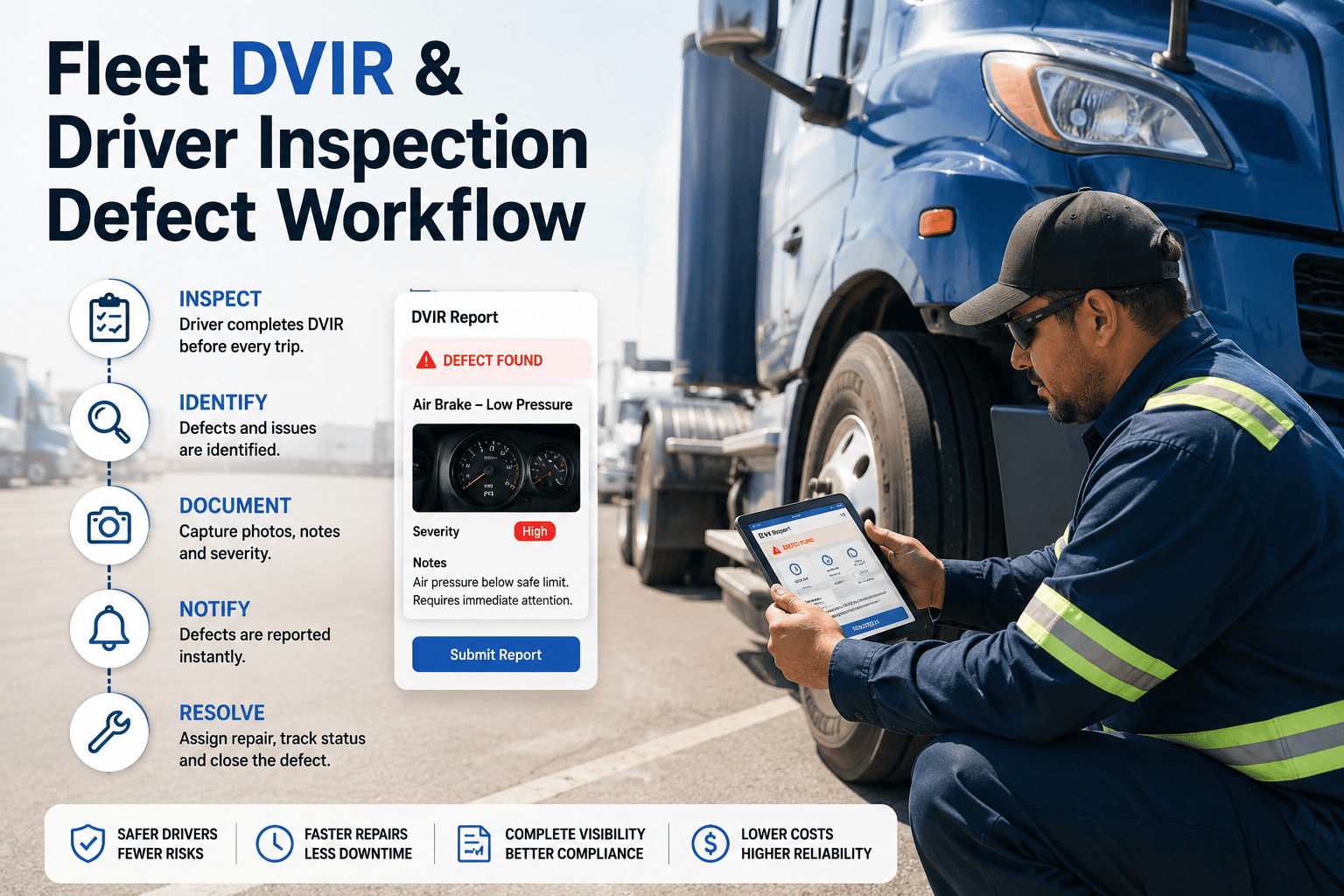
A damage claim gets denied not because the damage was not real, but because the photo taken at pickup was blurry, shot from the wrong angle, or never timestamped against the vehicle record it was supposed to prove. Fleets lose more disputed claims to inconsistent photo evidence than to any other single documentation gap, and the pattern is almost always the same — one driver shoots four angles, another shoots one, a third crops out the VIN plate, and nobody named the files in a way anyone can find six months later. A photo standard is not a nice-to-have for a DVIR checklist; it is the difference between a claim that closes in a week and one that drags through three rounds of dispute because the evidence cannot be trusted. This guide sets out the angles, resolution, naming convention, and metadata rules that make every fleet inspection photo defensible, and how a connected inspection workflow enforces them automatically instead of hoping every driver remembers. Standardize your inspection photo workflow in Oxmaint free and stop losing claims to photos nobody can rely on.
Fleet Inspections
DVIR Compliance
Claims Evidence
Fleet Inspection Photo Standards: Angles, Resolution, and Naming That Hold Up
A practical standard for pre-trip, post-trip, and damage inspection photography, so every image your drivers capture is sharp enough, complete enough, and traceable enough to settle a dispute the first time. Built for fleet operations and risk teams tired of chasing follow-up photos weeks after a trip has ended.
Why Photo Standards Matter
42%
of disputed damage claims cite incomplete or unclear inspection photos as a factor
6
minimum angles needed to fully document exterior condition at handoff
9 days
average delay added to claim resolution when photo evidence requires follow-up requests
The Problem
Why Inconsistent Inspection Photos Cost Fleets Real Money
Photo inconsistency rarely looks like a crisis in the moment — a slightly blurry shot, a missing angle, a filename that does not match the vehicle. The cost only becomes visible weeks later, when that exact photo is the one piece of evidence a claim depends on and it turns out to be unusable, and by then the vehicle has often already gone back out on its next trip.
1
Disputed Damage Claims
Without a full set of standardized angles taken at both pickup and return, a fleet has no way to prove whether damage existed before or after a trip, leaving liability decisions to guesswork and negotiation instead of evidence, and the fleet usually absorbs the cost by default.
2
Wasted Adjuster and Legal Time
Every time an insurance adjuster or legal reviewer has to request a follow-up photo because the original was unusable, resolution time extends by days, and staff time goes into locating a vehicle and driver from weeks earlier, assuming the vehicle has not already changed condition again.
3
Untraceable Evidence at Scale
A fleet running hundreds of inspections a week without a consistent naming and metadata standard ends up with photo folders that are effectively unsearchable, forcing manual review every time a specific vehicle event needs to be found, often across shared drives with no consistent structure at all.
The Standard
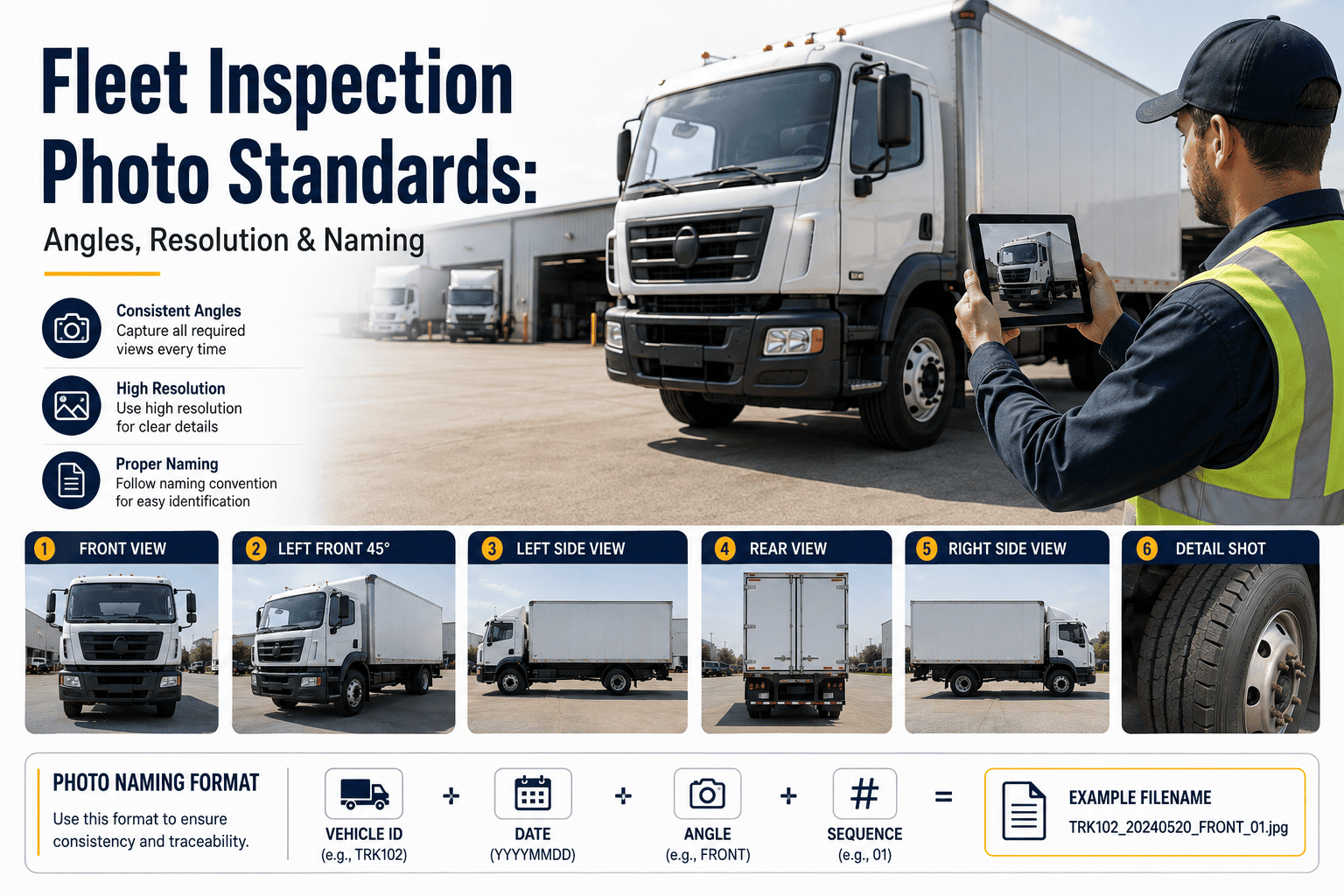
The Six Required Angles for a Complete Vehicle Inspection Set
A defensible inspection photo set does not depend on driver judgment about what looks damaged. It captures the same fixed angles every time, so the record is complete regardless of whether anything was actually wrong, and no reviewer has to guess what a driver chose not to photograph.
| Angle |
What It Must Show |
Common Mistake |
| Front three-quarter |
Full front bumper, hood, and both front fenders in one frame |
Shot too close, cropping one fender out of view |
| Rear three-quarter |
Full rear bumper, tailgate or doors, and both rear fenders |
Taken in low light without flash, obscuring existing scuffs |
| Driver side profile |
Full length of the vehicle from a perpendicular angle |
Angled shot that distorts panel proportions |
| Passenger side profile |
Full length of the vehicle from a perpendicular angle |
Skipped entirely when the passenger side is against a wall |
| VIN and odometer |
Legible VIN plate and current odometer reading in frame |
Glare across the odometer display makes the number unreadable |
| Interior cab condition |
Dashboard, seats, and any visible interior damage |
Taken from the doorway instead of inside the cab |
Scroll horizontally on smaller screens to view every column
Technical Requirements
Resolution, Lighting, and File Requirements That Make Photos Usable
Meeting the angle requirement is only half the standard. A photo that is technically complete but too low-resolution to read, or shot in poor lighting, is just as unusable in a dispute as a missing angle, and it is far harder to catch the problem until it is already too late to retake the shot.
Minimum
Resolution Requirement
A minimum of 8 megapixels per photo, or the default rear camera resolution on any phone from the last five years, is enough to read a VIN plate and identify panel-level damage on review, without generating file sizes that slow down upload in low-bandwidth yards.
Required
Lighting and Flash Rules
Flash should be enabled by default for any inspection taken before sunrise, after sunset, or inside a covered bay, since ambient lighting alone routinely hides scuffs and dents that only appear in direct light.
Enforced
Distance and Framing
Exterior angle photos should be taken from roughly ten to fifteen feet back, close enough to see panel-level detail but far enough to capture the full angle in a single frame without stitching multiple shots.
Automatic
Metadata Capture
GPS location, timestamp, driver ID, and vehicle ID should attach to every photo automatically at capture, removing any question about when, where, or by whom the image was taken, and eliminating any argument that a photo was staged or backdated.
Naming Convention
A File Naming Standard That Makes Every Photo Findable
A photo that cannot be located when a claim comes in is functionally the same as a photo that was never taken. A structured naming convention, applied automatically rather than typed manually by drivers, removes that risk entirely and makes every image retrievable in seconds instead of requiring a manual folder search across months of inspections.
VEHICLEID_YYYYMMDD_INSPECTIONTYPE_ANGLE.jpg
TRK4021_20260904_PRETRIP_FRONT.jpg
Vehicle Identifier First
Leading with the vehicle or unit number means every photo for a given asset sorts together automatically in any file system or CMMS search, regardless of when it was captured.
Date in ISO Format
Using a four-digit year followed by month and day keeps files in chronological order by default, avoiding the ambiguity of regional date formats across a multi-region fleet.
Inspection Type and Angle Last
Ending with inspection type and angle makes it possible to filter for a specific view across every vehicle at once, which is exactly what a claims reviewer needs when comparing pickup and return condition.
Rollout Plan
Five Steps to Rolling Out a Fleet-Wide Photo Standard
A photo standard only works if drivers can follow it without thinking about it. These five steps move a fleet from an informal habit to a standard that is enforced automatically at every inspection, across every vehicle, shift, and location, regardless of who is behind the wheel that day.
Step 1
Define the Required Angle Set
Lock in the exact angles required for pre-trip, post-trip, and damage inspections, and confirm they cover every panel and identifying detail a claim would ever need to reference.
Step 2
Build the Sequence Into the App
Configure the inspection app to prompt each angle in order and block submission until every required shot meets the resolution and lighting threshold, removing the standard from memory entirely.
Step 3
Automate Naming and Metadata
Apply the vehicle ID, date, inspection type, and angle naming convention automatically at capture, along with GPS and timestamp metadata, so no driver ever has to manually rename a file.
Step 4
Train on the Why, Not Just the How
Drivers who understand that a complete photo set protects them personally from disputed liability are far more consistent than drivers who see the requirement as an arbitrary extra step.
Step 5
Audit Completion Rates Monthly
Review a sample of inspections each month to confirm angle completeness and image quality are holding steady, and flag any location or shift where completion rates are slipping below target.
Damage Documentation
Additional Angles Required When Damage Is Present
The six baseline angles document overall condition, but any visible damage at inspection requires additional close-range documentation to be usable in a claim. Skipping these extra shots is one of the most common reasons a legitimate claim still gets challenged or settled for less than it should be.
Close-Range Damage Shot
A tight shot of the damage itself, filling most of the frame, so the extent and type of damage — scratch, dent, crack — is unambiguous on review without guessing from a distance shot.
Reference Shot With Scale
A second shot from a few feet back showing the damage in context with a coin, hand, or measuring tape included for scale, since size is often disputed when only a close-up exists.
Panel-Level Wide Shot
A wider shot of the full panel or component containing the damage, confirming exactly where on the vehicle the damage is located relative to the rest of the body.
Before vs After
What Changes When Photo Standards Are Enforced at Capture
The comparison below reflects the practical difference between fleets relying on driver discretion for inspection photos and fleets enforcing angle, resolution, and naming rules directly inside the inspection app.
Driver Discretion
Angle count and quality vary by driver and by shift
Files are named inconsistently or left with default camera filenames
No automatic timestamp or GPS tag tied to the vehicle record
Claims teams request follow-up photos that may no longer be possible to retake
Photo review during a dispute takes hours of manual searching
Enforced Photo Standard
Required angles are prompted in sequence and cannot be skipped
Every file is named automatically using a fixed vehicle and date convention
Timestamp, GPS, driver, and vehicle ID attach automatically at capture
Complete evidence sets exist from the first inspection, with no retake requests
Any photo is searchable and retrievable in seconds by vehicle or date
Field Conditions
Making the Standard Work in Real Yard and Road Conditions
A photo standard that only works in good lighting with strong signal is not a standard drivers can actually follow. Field conditions have to be part of the design, not an exception handled after the fact.
Offline Capture Support
Inspections completed in yards or rural routes without signal should still capture and store photos locally, syncing automatically once connectivity returns instead of forcing a driver to retake shots later.
Low-Light and Weather Handling
Rules for enabling flash and adjusting exposure should trigger automatically based on time of day and ambient light, rather than depending on a driver remembering to toggle a setting during a rushed pre-trip check before sunrise or after a late-evening return.
Cross-Team Access
Photos captured by a driver should be immediately accessible to maintenance, claims, and safety teams from the same record, avoiding the delay of someone emailing images between departments after the fact or re-requesting files that already exist somewhere in a different inbox.
FAQ
Common Questions on Fleet Inspection Photography
How many photos should a standard pre-trip inspection include?
A complete exterior and VIN documentation set typically requires six photos minimum, with additional shots added whenever visible damage is present at any angle during the inspection, plus an interior shot whenever cab condition is part of the handoff record.
What resolution is actually needed for inspection photos to hold up in a dispute?
Eight megapixels is generally sufficient to read a VIN plate and identify panel-level damage, which is well within the default resolution of any smartphone camera from the past several years.
Can drivers still use their personal phones for inspection photos?
Yes, as long as the inspection app enforces the angle sequence, resolution check, and automatic metadata tagging at capture, the photo standard is enforced regardless of which device takes the picture.
How long should inspection photos be retained after a trip?
Retention should match the claims and warranty windows relevant to the fleet, typically between one and three years, with any photo tied to an open claim held until that claim formally closes.
Does Oxmaint enforce the angle sequence automatically during inspections?
Yes — Oxmaint prompts drivers through each required angle in order, blocks submission if a shot is missing or below resolution threshold, and applies the naming and metadata standard automatically.
Start free to configure your fleet's required angle set.
Stop losing claims to photos nobody can rely on
Oxmaint standardizes inspection photography across every driver, vehicle, and location, so the evidence you need is complete, legible, and traceable the first time — every time.