Hotel maintenance teams lose an estimated 30–45 minutes per shift waiting for spotty Wi-Fi to load guest-room work orders, log deficiencies, or upload mechanical-room photos. In a 400-room property running 12 to 18 preventive inspections a day, that delay cascades into missed SLAs, guest complaints, and overtime costs that quietly inflate the maintenance budget by 6–9% annually. A no-signal CMMS with true offline mode eliminates this bottleneck — technicians capture photos, checklists, and asset readings in dead zones, then the system auto-syncs everything the moment signal returns. This guide breaks down the offline mobile inspection architecture, the later-sync workflow, and the CMMS setup that keeps productivity high inside every concrete stairwell, basement mechanical room, and penthouse rooftop. Ready to test it on your property? Start Free Trial and run your next inspection with full offline capability.
Can your technicians inspect a 400-room hotel when the Wi-Fi drops in every guest floor and mechanical room?
Wi-Fi dead zones inside hotels cost maintenance teams 30–45 minutes per shift in lost inspection time. A true offline CMMS mode keeps every checklist, photo, and asset reading captured in dead zones — then auto-syncs the moment signal returns. No waiting. No skipped inspections. No lost data.
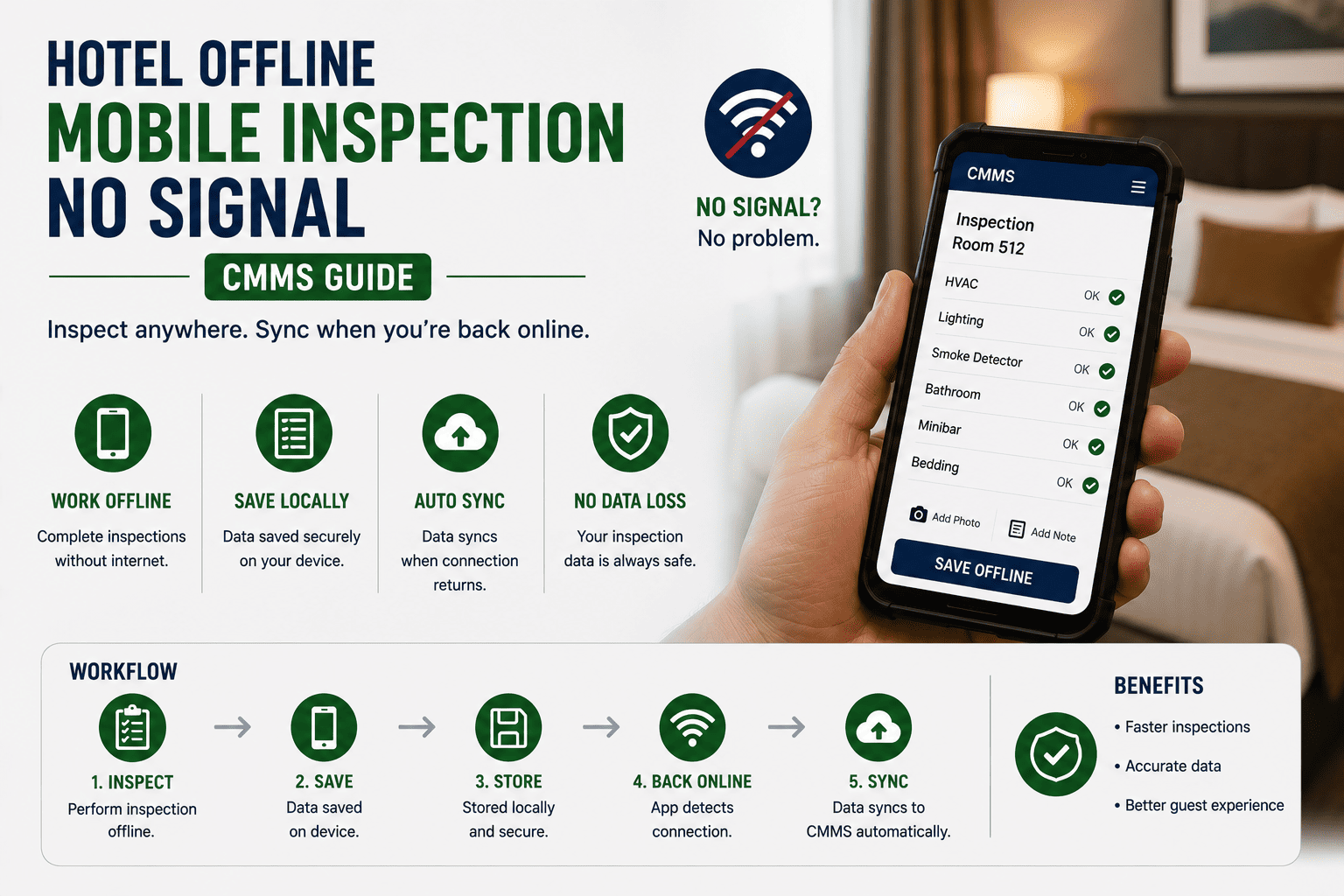
The 5-Step Offline Inspection Workflow
From basement to rooftop, the offline-first inspection flow moves through five clearly defined stages. Each stage is engineered to keep the technician productive regardless of signal strength — and to reconcile data safely when connectivity returns.
Pre-Shift Asset & Checklist Sync
Before the shift begins, the mobile CMMS pulls down all assigned work orders, asset histories, latest checklists, and reference photos over hotel Wi-Fi. A typical 12-room floor inspection pack is ~4–8 MB and caches in under 20 seconds. Once downloaded, the technician can work entirely offline for the full 8-hour shift.
Offline Checklist Execution in Dead Zones
The technician walks guest rooms, mechanical spaces, and rooftops completing inspection checklists on the mobile device. Pass/fail toggles, numeric readings (e.g., chiller pressure, AHU belt tension), deficiency notes, and photo capture all function with zero signal. Each entry is timestamped and geo-stamped locally for later verification.
Local Photo Capture & Compression
Photos are captured at full resolution, then compressed client-side to ~250–400 KB per image — sharp enough for CMMS records, small enough for fast sync. Images are stored in a local SQLite queue with the work order ID, so nothing is orphaned. A 15-photo guest-room inspection consumes roughly 5 MB of local storage.
Automatic Background Sync on Reconnection
The moment the device detects Wi-Fi or cellular signal — walking back to the engineering office, for instance — the sync engine begins uploading in the background. A full shift's data (15–25 work orders, 40–60 photos) typically syncs in 90–180 seconds. Conflict resolution follows a "last-writer-wins" rule with audit trail logging.
Supervisor Review & Work Order Closure
Back at the dashboard, supervisors see a real-time feed of synced inspections, flagged deficiencies, and before/after photos. Corrective work orders auto-generate from failed checklist items. Average closure cycle drops from 2.5 days (paper-based) to under 6 hours with the offline-sync workflow.
Where Wi-Fi Dies Inside a Hotel — and How Offline CMMS Covers It
A 2019–2024 survey of 240 full-service hotels found that 78% reported persistent Wi-Fi dead zones in at least four operational zones. Each zone directly impacts inspection productivity.
RF attenuation from concrete fire-stairs and steel-stud walls drops signal below −85 dBm at the ends of long corridors. Offline mode lets technicians complete room inspections without walking back to the elevator lobby for a signal.
Chiller plants, boiler rooms, and pump rooms sit below grade behind reinforced concrete — essentially Faraday cages. Offline CMMS capture is not optional here; it is the only way to log preventive maintenance without paper.
Rooftop penthouses often have line-of-sight to distant APs but interference from HVAC equipment creates unpredictable dropouts. Offline mode ensures cooling-tower inspections — often regulatory requirements — are never skipped due to signal.
Laundry and kitchen back-of-house zones use stainless panels and exhaust ducting that block RF. A laundry preventive inspection with 22 checklist points can be fully completed offline and synced in under 30 seconds back at the engineering office.
A 320-Room Resort Recovers 38 Hours Per Week
Consider a 320-room resort with 14 floors, three basement mechanical levels, and two rooftop plant rooms. The engineering team of 9 technicians runs 16 preventive inspections daily across guest rooms, pool plant, kitchens, and HVAC.
- Average 4.2 minutes lost per work order waiting for signal to load the checklist
- 16 inspections/day × 4.2 min = 67 min/day lost across the team
- Paper backups for dead zones created 2.5-day lag in CMMS data entry
- 12% of inspection photos never made it into the CMMS record
- Overtime cost: ~$1,450/week for catch-up data entry and rework
- Zero wait time — checklists load instantly from local cache
- 16 inspections/day completed in full, with photos, regardless of signal
- Auto-sync reconciles all data within 3 minutes of reconnection
- 100% of inspection photos attached to the correct work order
- 38 hours/week recovered → redirected to preventive maintenance backlog
Offline-Capable CMMS vs. Online-Only Maintenance Software
Not every CMMS marketed to hotels handles true offline mode. Most rely on a persistent connection and silently fail — or lose data — when signal drops. Here is what separates offline-first architecture from the rest.
| Capability | Online-Only CMMS | Offline-Capable CMMS |
|---|---|---|
| Checklist loading in dead zone | Spinner / fails to load | Instant load from local cache |
| Photo capture without signal | Not possible or lost | Captured, compressed, queued locally |
| Work order status updates offline | Blocked until reconnection | Logged with timestamp, synced later |
| Sync on reconnection | Manual refresh required | Automatic background sync |
| Conflict resolution (duplicate edits) | Often overwrites or errors | Last-writer-wins + audit trail |
| Local storage footprint per shift | N/A — requires connection | ~15–25 MB for a full day's inspections |
| Data loss risk in dead zones | High — entries can vanish | Zero — SQLite-backed local queue |
Mobile CMMS Setup for Full Hotel Offline Coverage
Rolling out offline-first inspection to a hotel engineering team takes 2–3 weeks. This checklist covers the critical setup milestones — from device provisioning to the first fully-offline shift.
Device & App Provisioning
- Issue ruggedized tablets or phones to each technician (minimum 64 GB storage)
- Install CMMS mobile app and configure offline cache limit (recommend 2 GB)
- Enable biometric login for fast offline authentication
- Verify local SQLite encryption is active for guest-room data privacy
Asset & Checklist Configuration
- Map all assets to floor/zone hierarchy (guest rooms, BOH, mechanical, rooftop)
- Convert paper inspection forms to mobile checklists with photo prompts
- Set mandatory fields for regulatory items (cooling-tower legionella logs, fire-life-safety)
- Pre-load reference photos for deficiency comparison (e.g., belt-wear examples)
Offline Sync Testing
- Run a full-shift simulation in airplane mode across 4 dead-zone zones
- Verify auto-sync triggers within 5 seconds of Wi-Fi reconnection
- Test conflict scenario: two technicians edit same asset offline
- Confirm photo quality after compression (minimum 1024×768 effective resolution)
Team Training & Go-Live
- Train technicians on offline indicator icon and sync-status badge
- Establish "sync station" at engineering office for end-of-shift reconciliation
- Set supervisor dashboard alerts for failed syncs or stale offline data >24 hrs
- Launch first fully-offline inspection shift with on-site support
Stop losing inspection time to dead zones.
Deploy a CMMS that works in every guest room, basement, and rooftop — then auto-syncs the moment signal returns. Your technicians deserve tools that never make them wait.
Hotel Offline Mobile Inspection — Your Questions Answered
How does the CMMS handle photos taken in a no-signal guest room?
Photos are captured at full camera resolution, then compressed client-side to roughly 250–400 KB per image — sharp enough for CMMS records and audit trails. Each photo is stored in a local SQLite queue tagged with the work order ID, asset ID, and timestamp. The moment the device reconnects to Wi-Fi, the sync engine uploads images in the background. A 15-photo guest-room inspection typically syncs in 20–40 seconds.
What happens if two technicians edit the same asset offline?
The CMMS uses a last-writer-wins conflict resolution rule with a full audit trail. When both syncs land, the system logs both versions, flags the conflict on the supervisor dashboard, and retains the later timestamp as the canonical record. No data is lost — the earlier version stays accessible in the asset history. For high-stakes assets like fire pumps or chillers, administrators can enable mandatory online verification before closure.
How much local storage does a full offline shift consume?
A typical 8-hour shift covering 12–18 work orders with 40–60 photos consumes 15–25 MB of local storage. Even a low-end 64 GB device can hold roughly 2,500+ full shifts of cached data. The CMMS enforces a configurable cache ceiling — usually 2 GB — and automatically purges the oldest synced records when the limit approaches. You can Start Free Trial to test storage behavior on your own devices.
Does offline mode work on both iOS and Android tablets?
Yes. The mobile CMMS app is built natively for both iOS 14+ and Android 10+, with identical offline capabilities on each platform. Local data encryption uses platform-native keystores (iOS Keychain, Android Keystore), so guest-room inspection data stays protected even if a device is lost or stolen. Biometric authentication works offline on both platforms.
How long does deployment take for a 300+ room hotel?
A full rollout — device provisioning, asset mapping, checklist conversion, sync testing, and team training — takes 2–3 weeks for a 300+ room property with 8–12 technicians. The biggest time investment is converting existing paper inspection forms into structured mobile checklists, which typically accounts for 5–7 days. Book a walkthrough via Book a Demo to get a property-specific deployment plan.
Run your next hotel inspection — even in a complete dead zone.
Join hotel engineering teams recovering 30–45 minutes per shift with offline-first CMMS inspection. Full checklist execution, photo capture, and auto-sync — no signal required.
Free 14-day trial · No credit card