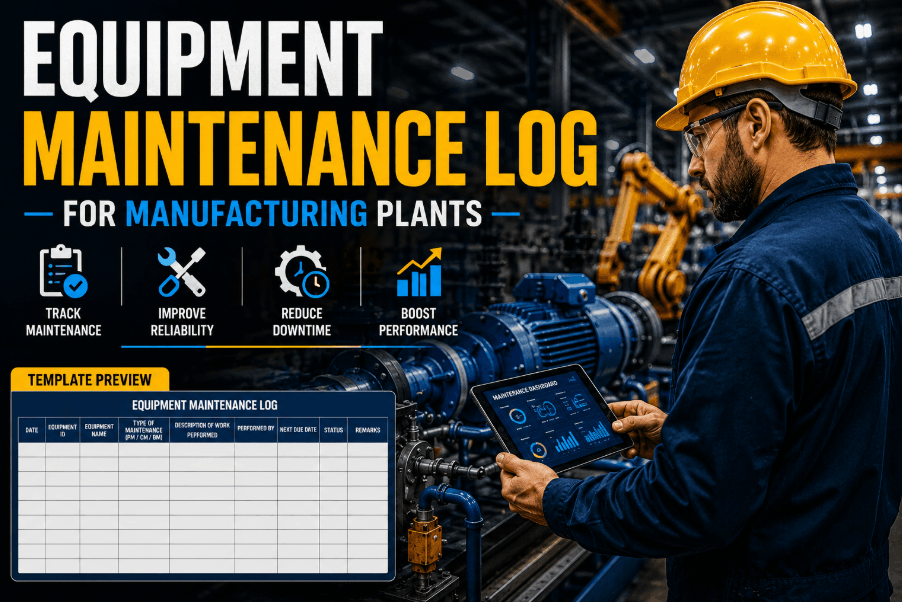
An equipment maintenance log template is the foundation of every reliable manufacturing plant maintenance programme. Whether you are tracking service history, part replacements, labor hours, or next-service intervals for your machinery, using the right maintenance log form ensures your plant stays audit-ready and downtime-free. In 2026, leading plants have moved beyond Excel-based maintenance logs to digital CMMS platforms like OxMaint — where every log entry is automated, timestamped, and instantly searchable. Sign Up Free and replace your static maintenance log template with a live digital record system from day one. With OxMaint, your equipment history log is always accurate, complete, and accessible from the floor — no manual entry, no lost records, no compliance gaps.
What an Equipment Maintenance Log Template Must Include
Core Fields Every Manufacturing Plant Maintenance Record Needs
Equipment Maintenance Log Template: Field-by-Field Breakdown
What OxMaint Captures Automatically vs What Paper Templates Miss
| Log Field | Paper / Excel Template | OxMaint Digital Log | Impact on Plant Operations |
|---|---|---|---|
| Asset ID & Equipment Name | Manual entry | QR scan auto-fill | Eliminates ID errors at point of service |
| Service Date & Technician | Written manually | Auto-timestamped & assigned | Tamper-proof audit trail per work order |
| Maintenance Type (PM / Corrective) | Free-text, inconsistent | Structured dropdown selection | Accurate planned vs reactive ratios |
| Parts Replaced & Part Numbers | Often omitted | Linked to live inventory | Real-time parts consumption tracking |
| Labor Hours & Cost | Estimated, not tracked | Timer-based & auto-calculated | Accurate cost-per-asset reporting |
| Next Service Date | Manual calendar note | Auto-scheduled PM trigger | Zero missed preventive maintenance tasks |
| Photo / Video Documentation | Not practical | Instant mobile capture | Rich fault records for root cause analysis |
| Technician Signature | Physical signature | Digital sign-off on mobile | Compliance-ready without paper handling |
How OxMaint Replaces Your Maintenance Log Template with a Live Digital System
From Static Spreadsheet to Real-Time Equipment Service Record
Limitations of a Static Equipment Maintenance Log Template
Why Excel Maintenance Logs Fail Manufacturing Plants at Scale
OxMaint Equipment Maintenance Log: Measurable Results for Manufacturing Plants
What Plants Achieve After Replacing Paper Logs with Digital Maintenance Tracking
How to Digitise Your Equipment Maintenance Log with OxMaint
Getting from Spreadsheet to Live Digital Maintenance Tracking in Four Steps
Manufacturing plants that transition from static maintenance log templates to OxMaint's digital system consistently report faster audit cycles, fewer repeat failures, and lower emergency maintenance spend within the first quarter. The platform captures everything a structured equipment maintenance record requires — asset ID, service date, technician, parts used, labor hours, and next service trigger — automatically, at point of work, on mobile. Sign Up Free to digitise your equipment maintenance log with no setup fee and no procurement cycle.
For multi-site enterprise evaluations, Book a Demo to walk through OxMaint's asset hierarchy configuration, cross-facility reporting, and ERP integration options with the product team directly. Enterprise plants typically complete configuration across all sites within the first two weeks of onboarding.
Plants that start with OxMaint's free tier today typically have their first digital maintenance records live within the same shift. There is no template to download, no spreadsheet to maintain, and no manual backfill required — your equipment history log starts building automatically from the first work order closed. Sign Up Free and see your first live asset log entry today.
Frequently Asked Questions
What is an equipment maintenance log template and what should it include?
An equipment maintenance log template is a structured record that captures asset ID, service date, maintenance type, technician name, parts replaced, labor hours, and next service date for every maintenance activity. Digital versions like OxMaint also include photo documentation and auto-generated PM triggers.
Is OxMaint's maintenance log template available for free download or use?
OxMaint offers a free sign-up tier that gives manufacturing plants immediate access to digital equipment maintenance logs, work order management, and basic PM scheduling — no template download required, records are live and cloud-hosted from day one.
Can OxMaint replace an Excel maintenance log template for a manufacturing plant?
Yes. OxMaint is purpose-built to replace Excel-based maintenance tracking with automated, timestamped digital records that update in real time at point of work — eliminating manual entry, incomplete records, and version conflicts common in shared spreadsheets.
Does the OxMaint maintenance log work offline in plant environments?
OxMaint includes true offline mode. Technicians log maintenance data, complete checklists, and close work orders without a network connection. All records sync automatically when connectivity is restored — ensuring complete logs even in basement equipment rooms or signal-dead zones.
How does OxMaint generate next-service dates from maintenance log data?
OxMaint links each log entry to a PM schedule. When a work order is closed, the system automatically calculates and schedules the next service date based on calendar interval, runtime hours, or meter reading — and sends push notifications to technicians when the task is due.
Can I export equipment maintenance history for ISO or regulatory audits?
OxMaint generates structured PDF and CSV equipment maintenance reports on demand — including technician sign-off, parts traceability, timestamps, and service history per asset — formatted to meet ISO, regulatory, and insurance audit requirements without manual assembly.
![preventive-maintenance-task-list-template--manufacturing-[download-free]](./manage-post-2k26/uploads/preventive-maintenance-task-list-template--manufacturing-[download-free].png)
![plant-maintenance-budget-template-2026-[excel---google-sheets]](./manage-post-2k26/uploads/plant-maintenance-budget-template-2026-[excel---google-sheets].png)