Most cement plants that run SAP Plant Maintenance already have the financial backbone they need. What they often lack is a maintenance front end that technicians actually use at the kiln, the mill and the packing plant. Connecting SAP PM to a mobile CMMS closes that gap, but only if the architecture is clear about which system owns which data and how changes travel between them. This guide sets out those decisions for a cement plant, and shows where Oxmaint maintenance management software fits as the execution layer.
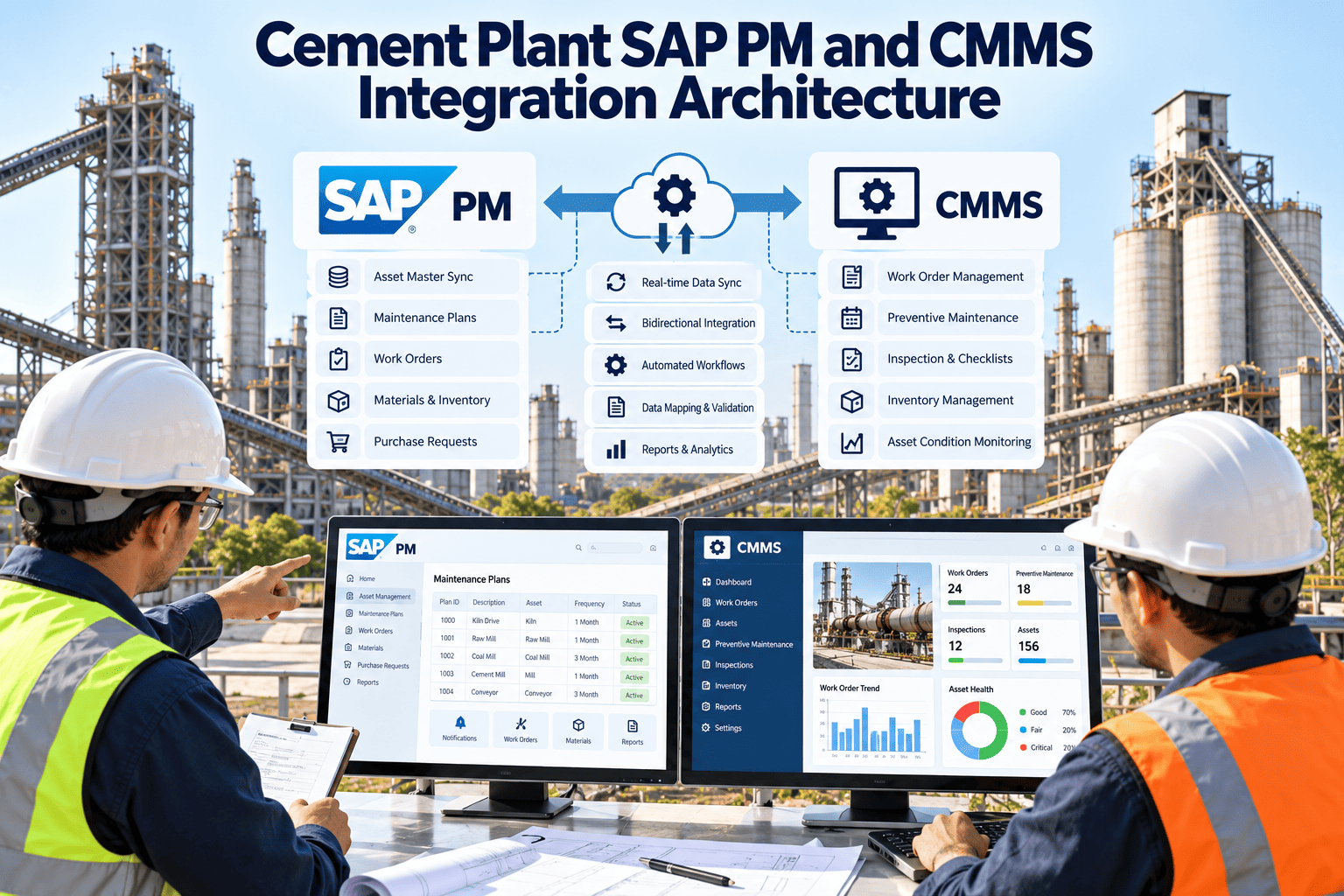
Cement Plant SAP PM and CMMS Integration Architecture
Keep SAP as the system of record for assets, cost and procurement, and give technicians a mobile execution layer, with defined data flows, ownership rules and error handling between the two.
Why Cement Plants Integrate Instead of Replacing SAP
Reference Architecture in Four Layers
Principles that keep the design clean
- Each data object has one owner, and the other system receives a copy.
- Integration moves business events, such as an order release or a confirmation, not raw database changes.
- Every message carries an identifier that links the SAP and CMMS records, so nothing is duplicated.
- Failures are visible, retried and reported, never silent.
Data Objects: Who Owns What and Which Way It Flows
| Data object | Owner | Typical direction | Cement plant note |
|---|---|---|---|
| Functional locations | SAP PM | SAP to CMMS | Hierarchy such as plant, area, line and unit, for example kiln line, cooler and fans |
| Equipment masters | SAP PM | SAP to CMMS | Includes classification, manufacturer data and installation location |
| Maintenance plans and task lists | SAP PM or CMMS by agreement | Depends on design | Decide whether preventive schedules are generated in SAP or in the CMMS |
| Notifications | Created in either | Both ways | Operators raise findings in the field; planners review and approve in SAP if required |
| Work orders and operations | SAP PM for order header and cost object | Both ways | Planned in SAP, executed and updated in CMMS, status returned |
| Time confirmations | CMMS captures, SAP posts | CMMS to SAP | Hours per technician and operation feed labour costing |
| Material reservations and issues | SAP MM | Both ways | Parts requested in the field must match the SAP stock position |
| Condition and inspection data | CMMS | CMMS to SAP as needed | Rich field data rarely fits SAP fields, so send summaries and references |
Choosing the Integration Interface
| Interface | Strength | Common use | Consideration |
|---|---|---|---|
| OData services | Web-friendly and near real time | Notifications, orders, status updates on S/4HANA | Check which services are available and activated in your release |
| BAPI | Transactional integrity through standard business functions | Order creation, confirmations and goods movements, widely used on ECC | Remote function calls need network and authorisation planning |
| RFC | Direct function-level access | Stock checks and master reads | Restrict to approved functions and service users |
| IDoc | Asynchronous and suited to volume | Bulk master data and batch postings | Latency is higher, so not ideal for urgent updates |
Let SAP Stay the Record While Technicians Work in One Mobile Tool
Scope your SAP landscape and see which flows fit before any build starts.
One Work Order, End to End
Master Data Governance Decides Whether Integration Works
Cement-specific data points worth planning for
- Large assets such as kilns, tyres, rollers and mill gearboxes with many components and long-lived records.
- Shutdown work with thousands of operations and parts that need bulk handling, not one-by-one sync.
- Operator rounds and inspections that generate many small records, which may stay in the CMMS with summaries sent to SAP.
- Critical spares and rebuild parts with long lead times that must reconcile with SAP stock and purchasing.
Design Decision: Where Should Preventive Schedules Live?
- Existing maintenance plans and task lists stay where they are
- Planners keep their current routine and approval flow
- Orders are released to the CMMS for field execution
- Best when SAP plans are well maintained and trusted
- Rounds, inspections and condition-based triggers are easier to configure
- Orders or notifications are sent to SAP for cost and parts handling
- Planners gain flexible scheduling by asset condition and usage
- Best when SAP plans are outdated or hard to change
Questions that settle the choice
- How accurate and current are the existing SAP maintenance plans and task lists?
- Who has authority to change intervals and tasks, and how quickly can they do it?
- Do inspection rounds and condition-based triggers need to create SAP orders, or only notifications on failure?
- Can SAP reporting still see the full preventive programme if schedules live outside it?
Cost, Parts and Settlement Flow
Handling Shutdown-Scale Volumes
- A kiln or mill shutdown can involve thousands of operations and parts, so bulk loads and batch interfaces are often better than record-by-record calls.
- Release orders in waves by work area, so technicians receive only what they need and devices stay responsive.
- Reserve all shutdown parts in SAP before the stop, then confirm kitting and issues in the field.
- Plan a reconciliation step after each shift, comparing completed operations in the CMMS with confirmations posted in SAP.
- Agree in advance how late scope changes are created and approved so both systems stay aligned.
Test Scenarios Before Go-Live
What Fails and How the Architecture Should Respond
Security and Access
- Use dedicated integration users in SAP with only the authorisations needed for the agreed flows.
- Review integration permissions at least annually, and remove access that is no longer needed.
- Encrypt traffic between systems and keep credentials in a managed store, never inside mapping files.
- Decide whether the connection runs through the corporate network, a secure gateway or a cloud channel, and document the route with IT security.
- Log every message with a timestamp and a result, which supports audits and troubleshooting.
- Apply role-based access in the CMMS, so technicians see only the orders and assets relevant to their work.
A Phased Roadmap
Operating the integration after go-live
- Name an owner for the integration who reviews failed messages every day during the first weeks.
- Keep a simple runbook explaining common errors, who fixes them and how to replay a message safely.
- Retest mappings after SAP upgrades, new order types or changes to the functional location structure.
- Review user feedback monthly, because field teams quickly reveal missing fields, slow screens and awkward steps.
- Track reconciliation gaps between the two systems and fix the cause, not only the individual record.
- Train new planners and technicians on which system to use for each task, so habits do not drift back to double entry.
How Oxmaint Fits the Execution Layer
- Mobile work orders and inspections capture field data where the work happens, including photos and notes.
- Asset management mirrors the structure planners need to see, with history linked to each asset.
- Preventive maintenance and scheduling support plans that run from the CMMS or follow SAP-driven schedules, depending on your design.
- Inventory and parts workflows help technicians request and record parts against orders.
- Dashboards and reports show backlog, compliance, downtime and repeat defects for maintenance teams.
- Oxmaint describes support for standard SAP interfaces such as BAPI, OData, RFC and IDoc. Confirm the scope for your SAP version and flows in a demo.
Measures of a Healthy Integration
Integration Readiness Checklist
- Data ownership agreed
- Flows and priorities ranked
- Approval rules documented
- SAP release and interfaces confirmed
- Test system available
- Security route approved
- Hierarchy cleaned
- Pilot area chosen
- Support contacts named
Frequently Asked Questions
Connect Your SAP Backbone to the Plant Floor
Plan the data flows, ownership and error handling first, then give technicians a mobile execution layer through Oxmaint.