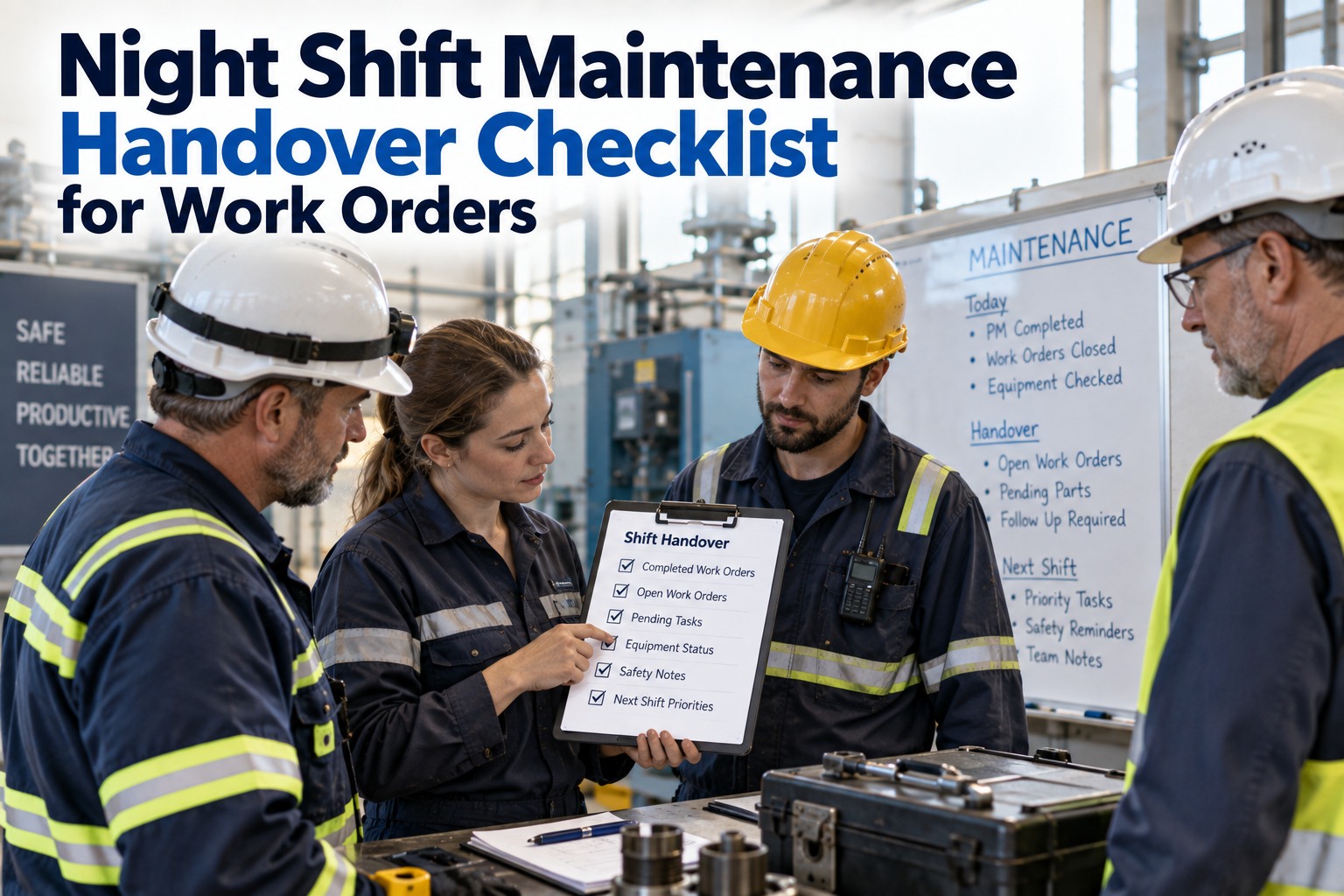
At 6:45 AM the night shift lead, coffee in hand, walks the day crew through an elusive conveyor vibration, fingers tracing notes in a paper log. If that handoff isn't captured clearly in a night-shift maintenance handover checklist, the issue will likely "sleep" until it snarls production later — again. Shift changes are one of the most hazardous moments for maintenance continuity: night crews work with fewer eyes on the floor and rely on notes, whiteboards or a shared spreadsheet, and when information is ambiguous or missing, open work orders go stale, PdM signals get ignored, and planners inherit a backlog that no longer reflects real risk. This guide is the practical checklist plus a lifecycle that keeps handovers actionable — feeding your EAM (Maximo, SAP PM or other CMMS) through Augment, without replacing it. See a live handover flow in a 30-minute demo.
Multi-Shift Continuity · Checklist + Overlay · Maximo / SAP PM · 2026
Night-Shift Maintenance Handover Checklist: Keep Open Work Orders Alive Across Crews
A 13-field checklist your night crew will actually use, plus Augment as the AI RCM overlay that ingests it — including scanned paper logs and voice notes — and turns handover entries into planner-reviewed Suggested WOs that push into your existing EAM. Nothing posts without human sign-off.
6:45 AM
the handover moment where continuity is won or lost
13-Field
baseline checklist adaptable to your plant
5-Step
Ingest → Detect → Diagnose → Prioritize → Dispatch
Overlay
EAM stays system of record — refines what gets in
Why a Strong Maintenance Shift Handover Checklist Matters
As a shift lead or planner you need a practical checklist that preserves context: what was observed, what was done, what to watch, and how urgent it is. A checklist that feeds your EAM without replacing it is the operational sweet spot. Sign up to start with a checklist your people will actually use.
The Handover Risk
Why Shift Changes Break Continuity
✕ Shift changes are one of the most hazardous moments for maintenance continuity
✕ Night crews work with fewer eyes on the floor and rely on notes, whiteboards or a shared spreadsheet
✕ When information is ambiguous or missing, open work orders go stale
✕ PdM signals get ignored — planners inherit a backlog that no longer reflects real risk
The Operational Sweet Spot
Checklist + EAM Overlay
✓ Practical checklist that preserves context — what was observed, done, to watch, and how urgent
✓ Feeds your EAM (Maximo, SAP PM or other CMMS) without replacing it
✓ Augment overlays your EAM as an AI RCM layer — refines what gets in, so nothing from a handover is lost
✓ Nothing posts to your CMMS without human sign-off
Quick Checklist: What to Include in Every Night-Shift Handover
Use this as a baseline maintenance shift handover checklist you can adapt to your plant. The list is intentionally short and readable on a clipboard or on a phone — because your night crew should not be fighting form complexity while troubleshooting. Book a demo to see the checklist wired into a live handover flow.
01
Asset ID and location (exact tag/zone)
02
Fault or symptom (short plain-language description)
03
When observed (timestamp) and who reported it
04
Current state (running, stopped, reduced speed)
05
Immediate action taken (taped, isolated, bypassed)
06
Sensor readings or PdM notes (vibration RMS, temperature, etc.)
07
Confidence level of observation (low / medium / high)
08
Suggested next-step (inspect, lubricate, temporary fix)
09
Suggested priority (safety, production-critical, schedulable)
10
Recommended assignee or trade required
11
Attachments: photos, voice notes, short video
12
Open WO reference (if already created) or flag to create one
13
Incoming lead sign-off (acknowledged / escalated)
Lifecycle Flow That Keeps Handovers Actionable: Ingest → Detect → Diagnose → Prioritize → Dispatch
A checklist is only as useful as the system that receives it. Here's how a digital overlay like Augment fits into your existing process — without ripping out your EAM. Book a demo to walk the lifecycle on your handover flow.
Step 1
Ingest
Augment captures entries from digital forms, mobile entries or even scanned paper checklists and voice notes, attaching them to the correct asset record.
Step 2
Detect
AI flags discrepancies, repeated complaints or abnormal sensor signals relative to the asset's history.
Step 3
Diagnose
Checklist notes are correlated with live PdM data to determine whether the symptom is escalating, intermittent or likely benign.
Step 4
Prioritize
Augment produces a Suggested WO list with priority scores and a recommended urgency for planner review.
Dispatch — Approved Entries Pushed Into Your EAM.
Planners accept, edit or defer Suggested WOs; once approved, entries are pushed into the plant's EAM (Maximo, SAP PM, etc.) as updated or new WOs. Augment overlays your EAM as an AI RCM layer — it does not replace Maximo or SAP PM; it refines what gets into them, so nothing from a handover is lost.
A Practical Night-Shift Handover Walkthrough
Scenario: The night tech notes a "soft knocking" on Pump P-22 at 02:30 and logs it on the checklist with a short clip and a quick vibration reading. Here is how the five steps run on that one entry. Sign up to run this scenario on your assets.
Pump P-22 · Soft Knocking @ 02:30 · Augment → Maximo
Ingest
Clip and reading captured · attached to P-22 automatically
Detect
P-22 flagged · prior vibration spikes occurred 3 times last month
Diagnose
Growing amplitude + concurrent temperature trend · PdM trendlines correlated
Med-High
Suggested Priority
PRIORITIZE Augment suggests medium-high priority WO · "inspect coupling, check alignment" as next step
REVIEW Planner reviews Suggested WO on morning rounds
ADJUST Priority raised to high based on planned production for the day
DISPATCH Augment pushes approved WO into Maximo · linked to original handover entry and attachments
In-Product Feel — A Living Notebook Layered Over Your EAM
Three panes turn a checklist entry into planner-ready action — timeline for the shift-level story, Signal → Confidence for the evidence, Suggested WO for the dispatch. Book a demo to see the three panes on your data.
Timeline
A shift-level view shows who reported each observation, when it first appeared, and what actions occurred across subsequent shifts. Helps you spot recurring complaints that might otherwise read as isolated incidents.
Signal → Confidence
Sensor curves (vibration, temp) displayed with an AI-derived confidence indicator. The UI highlights the signal segment tied to the handover note and shows a confidence band explaining whether the AI considers the reading noteworthy.
Suggested WO
For each flagged handover item, Augment previews an auto-generated work order — title, description, priority and required trade — so a planner can accept, edit or defer. Nothing posts to your CMMS without human sign-off.
Plant-Specific Examples
How media and concise notes from the night crew translate into higher-quality context for planners, reducing trips, correct-parts-on-first-visit issues, and unnecessary downtime. Sign up to run these patterns on your plant type.
Food and Beverage Line
A night operator hears a faint rattle on a packaging line. They capture a 10-second voice note and photo of the conveyor belt edge. Augment links the note to the conveyor motor, detects a minor vibration uptick in the sensor history, and suggests a lubrication check plus belt alignment. Because the WO includes the photo and clip, the day team can triage the required spare (belt splice vs. motor bearing) before heading out.
Water Treatment Plant
A technician records a transient turbidity spike and a pressure fluctuation on Filter Pack 3 at 03:15. Augment correlates the event with an upstream valve cycling pattern and recommends inspecting the valve actuator and filter media. The planner adds a lockout procedure to the Suggested WO and assigns an electrician and operator for plant-specific safety steps.
Paper Mill Dryer Section
The night crew notes a "thump" in the calendar rolls, attaches a thermal image showing a hot spot, and marks confidence as medium. Augment cross-references motor vibration and bearing temperature trends and recommends an immediate inspection of the roll bearings and a possible scheduled roll removal during the next planned outage window.
How to Digitize Without Disrupting Crews That Still Use Paper
Many plants use a hybrid environment — some crews on phone forms, others on paper. Augment is designed to be pragmatic. Book a demo to plan the hybrid rollout.
Map Existing Forms
Map your current paper/Excel forms to a simplified digital template; keep fields the same so crews don't relearn terminology.
Mobile Capture, Paper Fallback
Use mobile capture for photos and voice notes; if paper is still preferred, a quick scan or photo of the paper log can be ingested automatically.
Concise Note + One Media File
Train leads to capture a concise description and one short media file — this dramatically increases signal quality without adding burden.
Review-Only Guardrails
Set guardrails so Suggested WOs remain review-only until a planner approves them in the EAM.
Implementation Tips for Planners
Six moves that turn a pilot into a durable handover discipline — narrow focus first, prefill common templates, use the timeline as a standing agenda item, tune confidence weekly, expand cross-functionally, and review the form with the crews using it. Sign up to pilot on your highest-risk asset group.
01
Start with a single line — pilot the checklist overlay for one week on the highest-risk asset group; track handover completeness, suggested WO conversion rate and reassignments required
02
Configure the Suggested WO template for common quick-fix items — prefill trades, spares, estimated duration and safety steps for standard bearing replacements or alignment checks
03
Use the Timeline pane in daily standups to confirm that nothing from the night shift is dropped — a standing agenda item forces visibility and a short feedback loop
04
Review Signal → Confidence alerts weekly with reliability to tune thresholds; in heavy-noise environments (compressors, mills), raise the confidence threshold and rely more on human-confirmed entries
05
Expand the pilot cross-functionally — involve production leads, safety and stores so Suggested WOs carry the right material and permit needs; add a "pre-check stock" step where spares are off-site
06
Schedule a 30-day review with front-line leads to update form fields — crews often suggest small wording tweaks that vastly improve clarity ("knocking" vs. "impact noise at 1Hz")
Checklist Governance: Who Does What
Four roles keep the handover honest — capture, acknowledgement, planner triage and reliability tuning — each with a clear ownership boundary. Book a demo to walk the governance on your team structure.
Night Shift Lead
Capture observations, attach media, indicate immediate actions, and mark confidence.
Incoming Day Lead
Review timeline, confirm acknowledgement, and escalate if needed.
Planner
Review Suggested WOs, edit priority or scope, and release into the EAM for scheduling.
Reliability Engineer
Monitor recurring issues and adjust PdM thresholds if trends indicate failure progression.
"
Augment is built to reduce friction and preserve context across shifts by overlaying AI-driven RCM guidance on top of your existing Maximo, SAP PM or other EAM — never ripping out the system your team relies on. If you want to keep open work orders alive across crews, start with a checklist that your people will actually use and a tool that improves what gets into your CMMS, not how your CMMS is run.
Augment Reliability Desk
FAQ — Common Questions From Shift Leads and Planners
Will our EAM data integrity be compromised?
No. Augment overlays checklist intelligence and pushes approved edits into your EAM. The EAM remains the immutable system of record; Augment only suggests or supplements entries.
How hard is it to digitize our current handover checklists?
It can be quick. Augment maps existing paper or Excel checklists into digital flows with low IT lift, and it can ingest scanned logs while teams transition.
What happens if my team skips a handover entry?
The overlay flags incomplete or ambiguous items for review and prompts both outgoing and incoming leads to resolve or confirm them before the shift is fully closed.
Does this work for both skilled and less-experienced crews?
Yes. Augment extracts plain-language notes and pairs them with asset context and images so any crew member can add meaningful entries and incoming crews can understand what matters.
How do I control which checklist items convert into real WOs?
You do. Augment creates Suggested WOs that planners review and approve. Nothing is automatically deployed to the CMMS without human confirmation.
Keep Open Work Orders Alive Across Crews.
Start with a checklist that your people will actually use and a tool that improves what gets into your CMMS, not how your CMMS is run. Want to see a live handover flow from checklist to EAM? Book a demo — or sign up to try Augment in your plant.


.png)
